
General Details
The General Details section is the first page you see when creating a test, and it must be completed before adding test questions. This form captures essential information about the test. Some fields help hiring teams understand the test’s purpose and determine if it aligns with role requirements, while others define test duration, scoring, and candidate instructions.
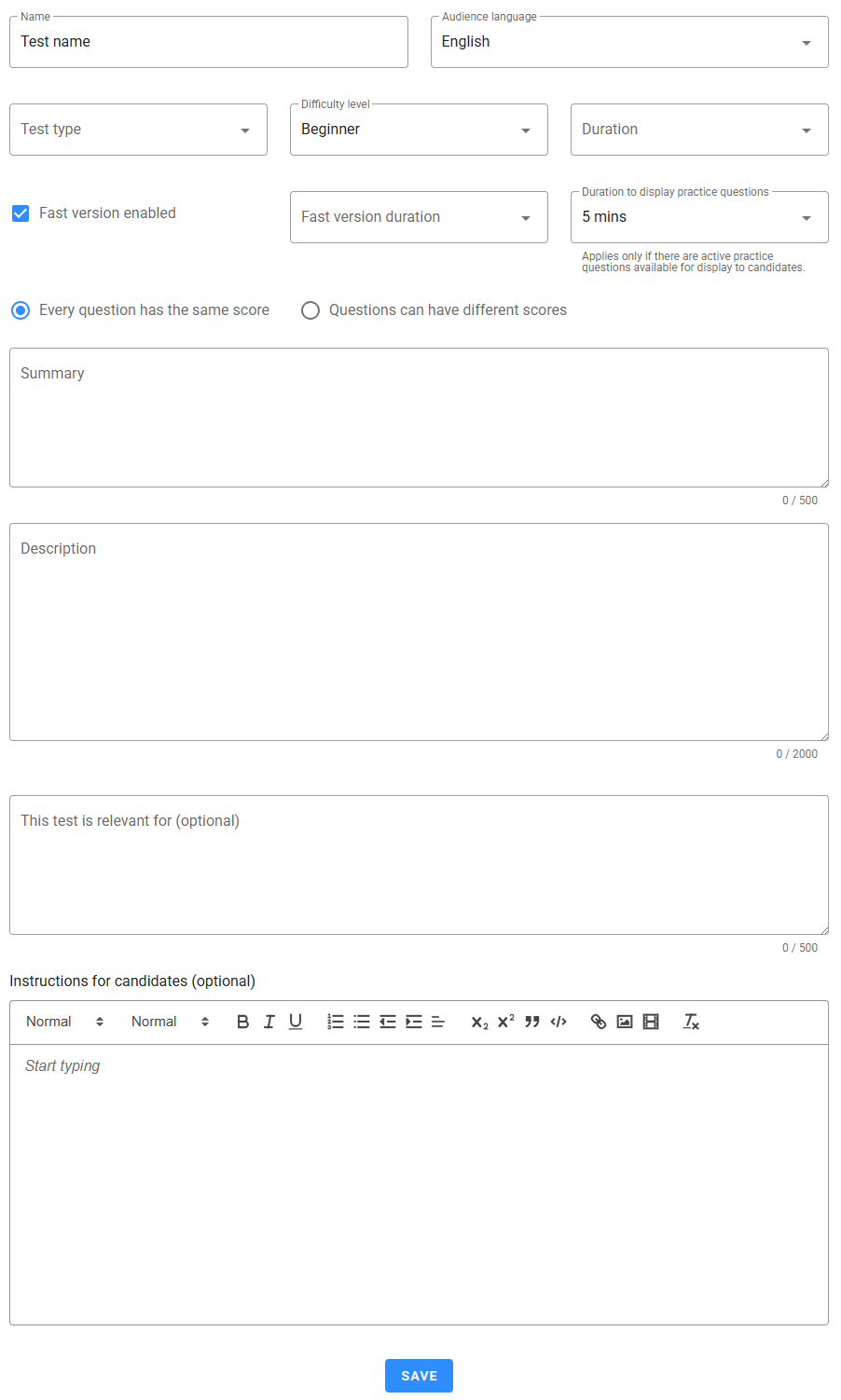
Below is a brief explanation of each field:
Name: The name of the test, which is how you and your colleagues will identify it when adding it to assessments. The test name is also displayed to candidates before the test begins. Test names must be unique among all custom tests, except for cloned tests, which can retain the same name. Cloned tests are identified by the word "clone" and the version number (when greater than 1), in parentheses, following the test name in the Overview view. For example, (clone 2) indicates it is the second clone of the original test, regardless of whether it was cloned from the original or from another clone.
Audience Language: A dropdown to select the test's audience language. Only jobs matching this language can use the test in their assessments.
Test Type: Choose one of the following test types:
- Coding skills
- Cognitive ability
- Others
- Personality
- Role-specific skills
- Software skills
Difficulty Level: Indicate the expected difficulty level to help hiring teams assess if it’s suitable for the intended roles. Options include:
- All levels (suitable for any skill level)
- Beginning
- Intermediate
- Advanced
Duration: Set the time limit for the test, from 1 to 60 minutes.
Fast Version Enabled: When enabled, allows you to create a shorter version of the test by selecting specific questions for this version.
Fast Version Duration: Set the time limit for the fast version of the test, which will apply if this version is selected in an assessment.
Duration to Display Practice Questions: When sample questions are included, set a display limit from 1 to 10 minutes. You can also opt to make sample questions available only for internal preview by hiring teams, without displaying them as practice questions to candidates.
Scoring Criteria: Choose between Every question has the same score (where the system assigns 10 points per correct answer) or Questions can have different scores (allowing scores from 1 to 10 per question).
Summary: A brief, internal summary of the test contents for hiring teams. This will not be shown to candidates.
Description: Detailed information about the test’s purpose, structure, and intended use for hiring teams. This field is for internal use and will not be visible to candidates.
This Test is Relevant For: Optional notes on roles or positions best suited for this test.
Instructions to Candidates: Optional but recommended field to clearly outline the test’s purpose, format, and guidelines, giving candidates a clear understanding of what to expect. Include important details like the skills being assessed to help candidates approach the test with confidence.
Duration to Display Instructions: Set the time limit for candidates to view the instructions. Ensure it provides enough time for candidates to understand the test’s purpose and expectations.
While the test status is set to Draft, you can edit any field. Once published, only the Summary, Description, and This Test is Relevant For fields can be updated. Archived tests cannot be modified. Be sure to click Save to apply any changes.