Interview Schedule Templates
Offering candidates the flexibility to schedule appointments at their convenience using predefined time slots benefits both candidates and hiring teams. Candidates appreciate the autonomy to choose a time that suits them, reducing stress and scheduling conflicts, while also fostering a positive impression of the company as one that values their time. This approach can lead to a smoother, more candidate-friendly interview experience.
For hiring teams, predefined time slots streamline the scheduling process by eliminating back-and-forth communications, saving recruiters valuable time and helping the interview process run efficiently. It also ensures that interviews are appropriately spaced, giving interviewers sufficient time to prepare. Allowing candidates to self-schedule in this way supports both operational efficiency and a respectful, seamless candidate experience.
Interview schedule templates in Zamdit make it easy to set up and reuse time slot configurations across various interview stages or jobs. When an interview stage requires candidate scheduling, pre-set time slots enable candidates to book directly, ensuring consistent, easily managed schedules.
Creating and editing interview schedule templates
To create or edit an interview schedule template, you’ll be guided through a popup window divided into two main sections. Changes are saved only when you click Save.
Template details
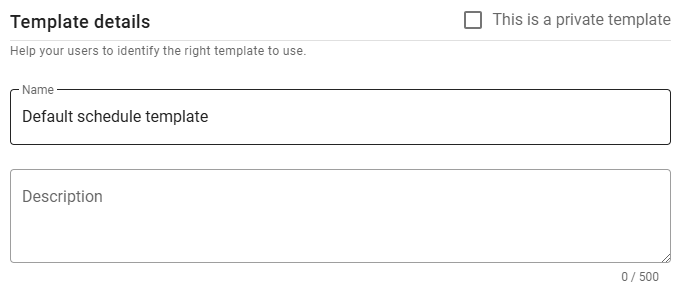
In this section, define the template's Name and Description to make it easily identifiable.
⚠️ Note for Admin users
When creating a new template, you can mark it as private by selecting the checkbox in the top-right corner. Once saved, this option cannot be changed.
Schedule settings
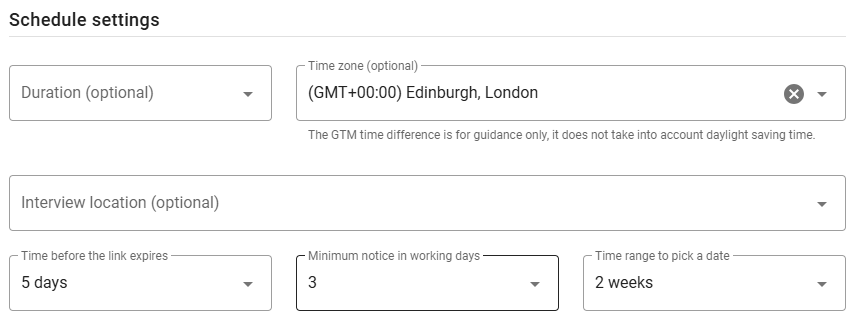
The Schedule Settings section includes all fields necessary to set up the schedule. Some fields are optional, but they must be completed in the final job schedule that uses this template. This flexibility allows the same template to be applied across multiple jobs without having to predefine details like the duration or location for on-site interviews.
Parameters
- Duration: Specifies the total interview duration per slot.
- Time zone: Sets the time zone of the interview; defaults to the company’s time zone.
- Interview location: For on-site interviews, choose the location from available company locations.
- Time before the link expires: Defines the deadline for candidates to schedule their interview, based on a set number of days after the invitation is sent.
- Minimum notice in working days: Specifies the minimum number of working days required between the current date and the candidate’s selected interview date.
- Time range to pick a date: Sets the range of dates candidates can choose from. If no slots are available within this date range, the system will automatically present the next week with available slots.
Time slots
Define available time slots by specifying one or multiple time ranges for each day of the week. Once set, these slots will apply consistently across all weeks. Bank holidays are automatically excluded from schedules.
Select the days of the week to include and use the Plus icon to add new time ranges, or the Delete icon to remove them. Overlapping or invalid ranges will not be permitted.
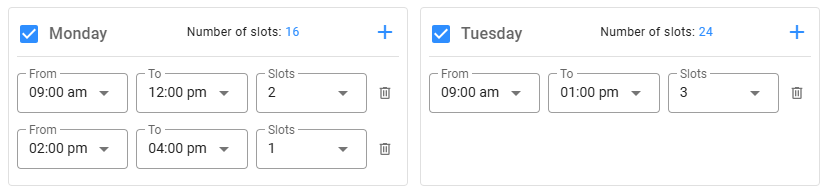
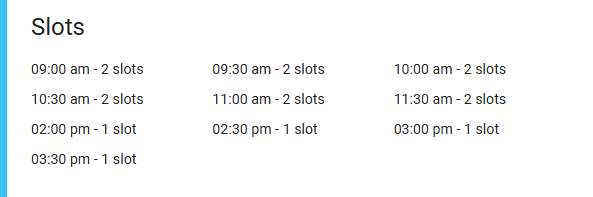
If the template’s duration field is set, you can view the exact number of slots and their times by clicking the Number of slots link at the top of each enabled day.