
Job Edition - Recruitment Sources
The Recruitment Sources page provides links for promoting the job through the default source, and it enables you to add external recruiters and manage other channels used for job promotion. Note that additional users with job editing privileges (added via the Permissions to Edit the Job section) cannot make changes to any sections on this page.
This page is divided into three sections:
Default links
This section contains links for promoting the job via the default source. You can copy these links to the clipboard by clicking the Copy icon:
- Job Description URL: Leads to a job description view suitable for sharing on your website or other channels. This view includes a button for candidates to request to apply. Jobs listed on the Zamdit-generated Careers Portal will use this link.
- Embeddable Job Description URL: Provides an iFrame-compatible job description view with a request-to-apply button, allowing you to embed job descriptions directly on your website.
- Request-to-Apply URL: Directs candidates to the application view and is ideal for situations where you provide your own job description.
When inviting candidates to apply, the Request-to-Apply URL is included in their invitation email. Zamdit adds job details to the welcome page of the application form, ensuring candidates understand the role before proceeding.
In attribution reports, candidates are categorized as Requested (default) or Invited (default) based on how they accessed the application form.
External recruiters
This section lets you add and configure external recruiters to source candidates for the job. External recruiters are not system users, but they can interact with the recruitment process via their portal, with limited actions.
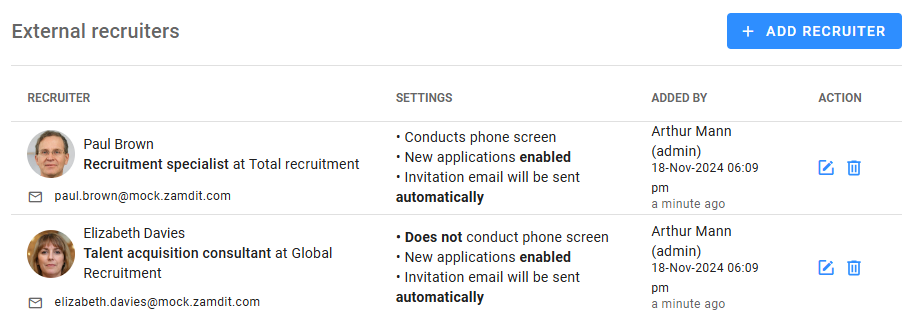
External recruiters leverage their networks, databases, and expertise to identify suitable candidates. Adding external recruiters provides them with a unique URL to share with potential candidates. After conducting a phone screen, they can complete the interview evaluation, which is sent directly to the Job Progress Board.
To add a recruiter, click the Add Recruiter button to select from the available recruiters for your organisation. If the recruiter isn't listed, click the Plus icon at the top right to add them.
For each external recruiter, you can configure:
- They will conduct their phone screen interview: Allows external recruiters to conduct phone interviews and submit evaluations. This option is only available if a Phone Screen stage exists in the pipeline.
- Send invitation email automatically: Sends the recruiter an invitation email automatically when the job is published. If this option is disabled or the job is already published, you must manually send the email using the Send icon.
- New applications enabled: Enabled by default, this setting can be turned off at any time after publication to stop receiving applications from the recruiter.
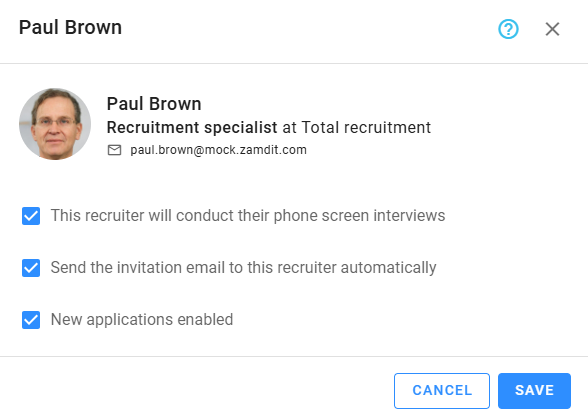
You can delete an external recruiter if the job is unpublished or if the invitation email hasn't been sent. In attribution reports, candidates sourced through external recruiters are credited to them by name, and recruiters can track candidates and submit evaluations through their portal.
Additional sources
This section is for managing additional sources like "LinkedIn" or "Indeed". While Zamdit does not automatically publish jobs to external boards or social media, you can manually share job links through these platforms.
Click Add Source to choose from the available recruitment sources for your organization. Only administrators can modify this list. If a source is missing, contact an Admin user to add it.
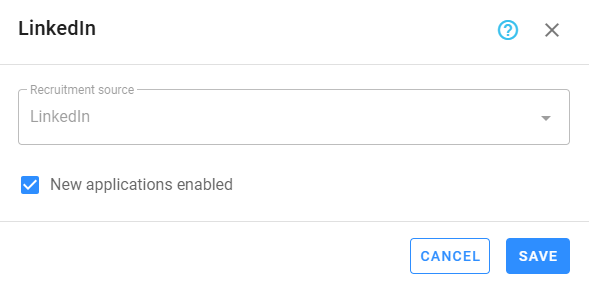
For each source, you can configure the New applications enabled setting. This is enabled by default but can be disabled at any time after publication to stop receiving applications from the source. Candidates are attributed to the source they used to apply.
💡 Stop receiving applications from all sources
If you want to stop receiving applications entirely, you can adjust the Job Application Settings. This is more efficient than disabling the New applications enabled setting for individual sources or recruiters.