
Invite Candidates
Attracting top talent requires more than just job postings; it involves leveraging referral networks and directly engaging with potential candidates. The Invite Candidates feature in Zamdit allows your team to take a proactive approach by inviting candidates using flexible methods. Whether through bulk invitations to reach a larger audience or personalized invites for targeted outreach, these options help you expand your talent pool, enhance recruitment efficiency, and attract candidates who align with your organization's culture and needs.
Bulk Invitations
Users with invite permissions for an open position will see the Invite button in the following locations:
- On the job card when viewing a list of jobs.
- In the Progress Board toolbar, if they are part of the hiring team.
- In the candidate details view, for candidates who have not yet been invited to the job.
The third option displays a list of available jobs for the candidate. Selecting a job will immediately send the invitation email via Zamdit. For the first two options, clicking the Invite button opens a pop-up window where you can add potential candidates using one of three methods:
- Manually entering candidate information.
- Pasting data from a spreadsheet or text file (fields must include email, first name, and last name, in that order).
- Adding candidates from the company's candidate pool.
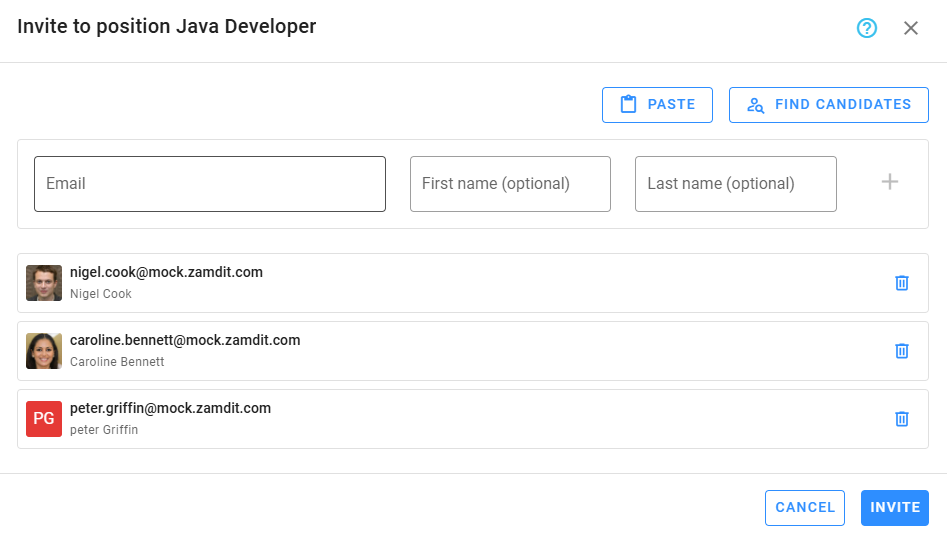
In all cases, only the email address is mandatory. Once the list is prepared, click Invite. Any entries that fail (e.g., candidates who have already applied or been invited) will be skipped and listed for your review after processing.
Personalized Invitations
Personalized invitations are particularly effective when working with external recruiters. Recruiters can share their unique link with potential candidates who meet the job requirements. While external recruiters may also use custom tools or automated email systems outside of Zamdit, candidates applying via a recruiter’s unique link will be visible in the recruiter’s portal. From there, recruiters can track applicants and conduct phone screens if needed.
Organization users can also send personalized invitations by sharing the Job Description URL. However, this method has limitations:
- Emails sent this way are not logged in Zamdit.
- A candidate may receive duplicate invitations from multiple users.
- Candidates applying through this method are not attributed to a specific user and are instead classified as self-applied.
Attribution and Reports
Zamdit tracks the source candidates use to apply, ensuring accurate attribution for both internal users and external recruiters. When candidates apply through an external recruiter’s unique link or via the Invite option in Zamdit, their referral source is logged.
Key reports for monitoring referral sources include:
- Candidates by Source, available in the Progress Board reports for a specific job.
- Referrals, accessible from the Reports menu in the App toolbar.