
Plans and Subscriptions
Zamdit is a subscription-based platform offering monthly or yearly plans. Clients choose from various service tiers, each allowing a maximum number of candidates to be processed during each billing period. Exceeding this limit incurs additional charges per candidate.
The main differences between plans lie in the number of allowed users and the maximum number of candidates included per period. Higher tiers come with reduced unit costs for additional candidates. For the Standard plan or higher, users can access features such as Custom Email Domain and Templates and a Custom Career Portal Domain.
Although a plan must be selected during account creation, Zamdit offers a trial period during which you can explore the platform for free, without needing to enter payment details. If you wish to continue using Zamdit after the trial ends, you’ll need to set up your subscription and payment information before the trial expires. Your first payment will be processed about an hour after the trial period ends.
Plan & billing view
ℹ️ Note
Only the Account Owner can access this feature.
The "Plan & Billing" view provides access to all company status information, subscription management, and payment records. This view is divided into three main sections:
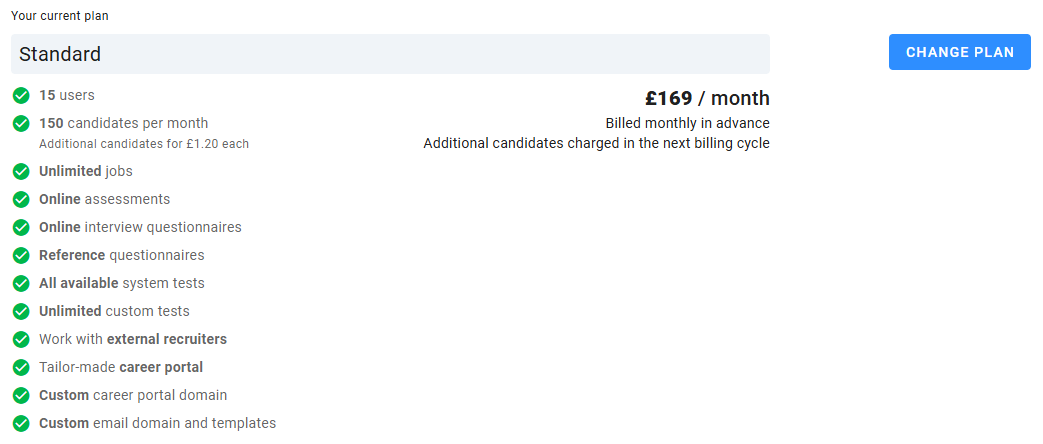
Current plan
This section displays your current plan’s features, monthly payment details, and billing frequency (monthly or yearly). An annual plan offers two free months, equating to a 16.7% discount. You can change your plan via a button in this section, although it will be hidden if you have pending payments. Note that additional candidates are billed monthly regardless of the primary billing cycle.
Additional candidates
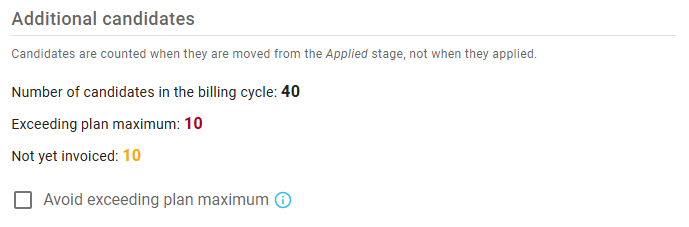
Here, you’ll find details on the number of candidates used within the current billing cycle:
- The total candidates processed.
- Remaining candidates allowed under your plan (if within the limit).
- Candidates exceeding the maximum (if applicable).
- Extra candidates not yet invoiced (if applicable).
You can also choose to restrict exceeding your plan's candidate limit. When selected, users will be unable to move candidates from the Applied stage if the limit has been reached, until the next billing cycle.
Alerts and actions
This section displays relevant alerts and actions based on your subscription status and any pending actions. Available options include:
- Subscribe – For accounts without an active subscription.
- Pay now – If there’s an outstanding payment.
- Confirm payment – When a payment confirmation is required.
- Cancel upgrade – If there’s a pending upgrade payment.
- Reactivate subscription – When your subscription is scheduled for cancellation but is still active.
Additional options appear at the bottom:
- Billing history – View and download invoices as PDFs.
- Billing details – View and edit billing information.
- Payment method – Update your payment method if needed.
- Cancel subscription – Option to cancel, though your account will remain active until the end of the billing period.

Subscription status
Trial period
The trial period starts when you create an account. Candidates added during this period don’t count toward your plan’s candidate limit. You can set up your subscription anytime during the trial. The first payment will be collected an hour after the trial ends, but you can cancel beforehand without charge.
During the trial, plan upgrades require no action, and downgrades are possible if a subscription hasn’t been set up. If a subscription isn’t set up before the trial ends, your status becomes Cancelled. If payment confirmation is needed and isn’t received within 23 hours, your status will also change to Cancelled. At the end of the trial period, if Test Data mode is enabled, it will be automatically disabled.
Pending
If a payment confirmation is required after the trial, your subscription status will show as Pending for 23 hours, during which time you’ll receive an email notification. Confirm payment by selecting Confirm Card Payment in the Plan & Billing section. Once payment is confirmed, your subscription becomes Active.
Active
Following the initial successful payment, your subscription status will be Active. Annual plans bill extra candidates monthly, and if payment cannot be collected, candidate movement from the Applied stage is restricted until payment is received.
When Active, you can upgrade your plan or schedule cancellation.
Cancelled
Your subscription will be set to Cancelled when:
- The trial period ends without a subscription setup.
- The first payment is unconfirmed within 23 hours.
- A renewal payment isn’t collected within 3 days.
- At the end of the billing period, if you had requested to cancel the subscription.
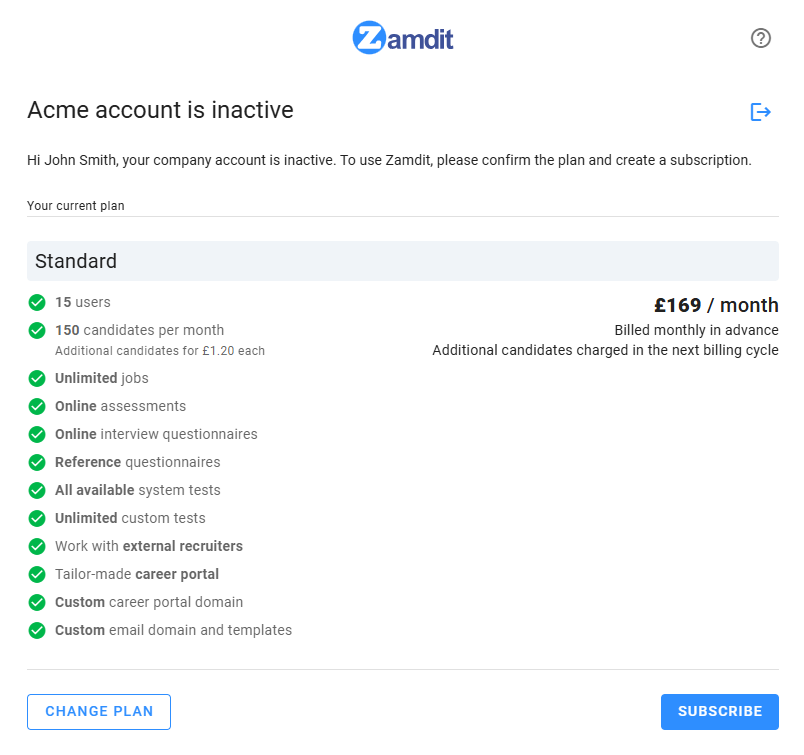
When Cancelled, accessing Zamdit redirects you to the Company inactive view, where you can reactivate your subscription.
Changing your subscription
Upgrading your subscription
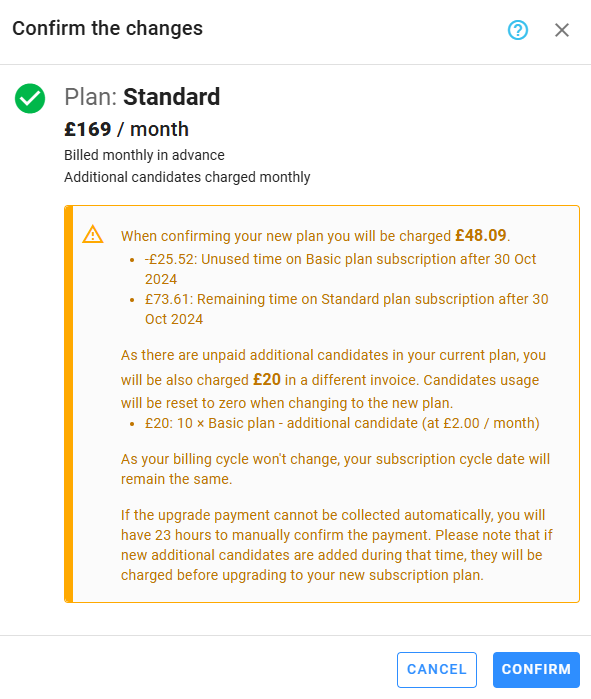
If Active, you can upgrade your plan by selecting Change Plan. If there’s a balance change due to proration, Zamdit will display a detailed breakdown before proceeding. Any unpaid extra candidates will also be charged.
Downgrading your subscription
To downgrade, cancel your current plan. After the billing period ends, select the desired plan and complete the setup. During the setup process, your data remains intact, and candidates can still access the system.
Invoices
Invoices are generated at the beginning of each billing cycle, and payments are collected an hour later. For annual plans, excess candidate invoices are billed monthly. You’ll receive a copy of each invoice by email, and you can download them as PDFs from the Billing History section.