Question editor
The Question Editor opens in a pop-up window when adding or editing a question. For new main questions, you’ll need to first select the question type and the coding language for coding questions. Non-coding questions will skip to the final setup stage, where you’ll enter the question text and configure answer options as needed. The question text supports images, code blocks, and other common formatting features.
⚠️ Save Changes
Changes made in the Question Editor are not saved until you click Save. If you close the window or click Cancel, all changes will be discarded.
Select Question Type
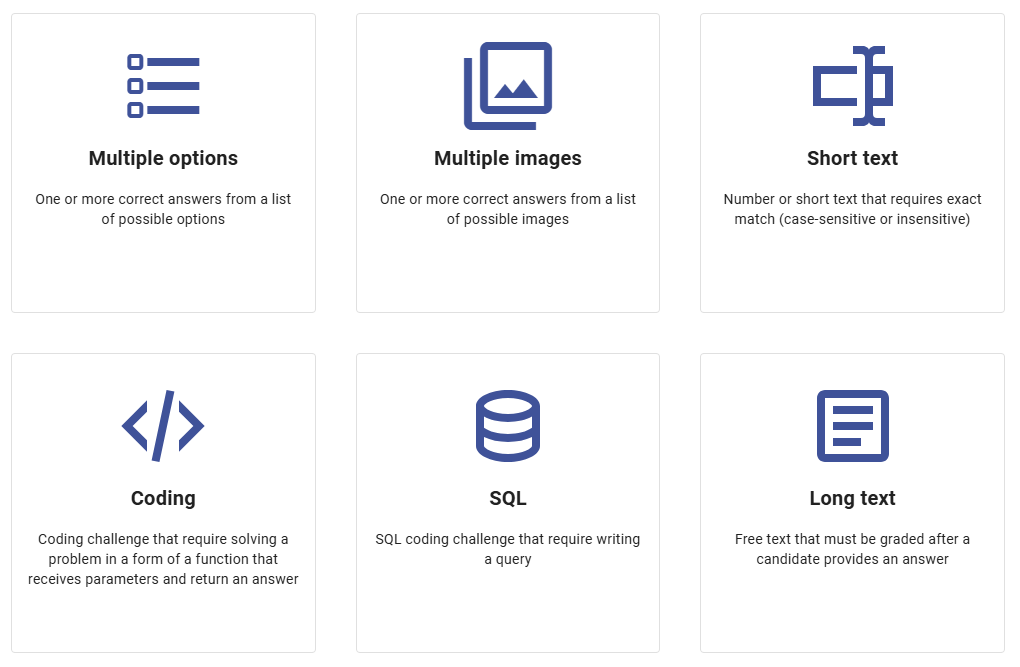
The first page of the editor requires you to select a question type from the following options:
Multiple options: Allows for one or more correct answers from a list of possible options. It can be used for single or multiple choice, as well as True or False questions. For single choice, you can select either one or multiple correct answers, and for multiple choice questions, you can specify the number of responses required. Options can be shuffled before displaying to candidates or shown in the provided order.
Multiple images: Similar to Multiple options, but instead of text, the options are images.
Short text: Accepts a number or short text that requires an exact match. By default, answers are case-sensitive, but you can make them case-insensitive if needed. This type allows for one or multiple correct answers.
Coding: Presents a coding challenge requiring candidates to solve a problem in the form of a function that receives parameters and returns an answer. You must select one of the 12 programming languages supported by the system. Answers are validated using test cases defined during question setup.
SQL: SQLite coding challenge that requires candidates to write a query. This type supports SELECT, INSERT, UPDATE, and DELETE queries. Answers are validated through test cases and a verification query defined during question setup.
Long text: A free-text question that must be graded manually after the candidate provides an answer. These questions are not graded automatically; however, Zamdit allows you to use internal or external reviewers before assigning a final mark.
Select Coding Language
For coding questions, you’ll select one of the 12 supported coding languages. System test cases support multiple languages for flexibility, but custom coding questions currently do not support this feature.

Settings and Answers
Multiple Options
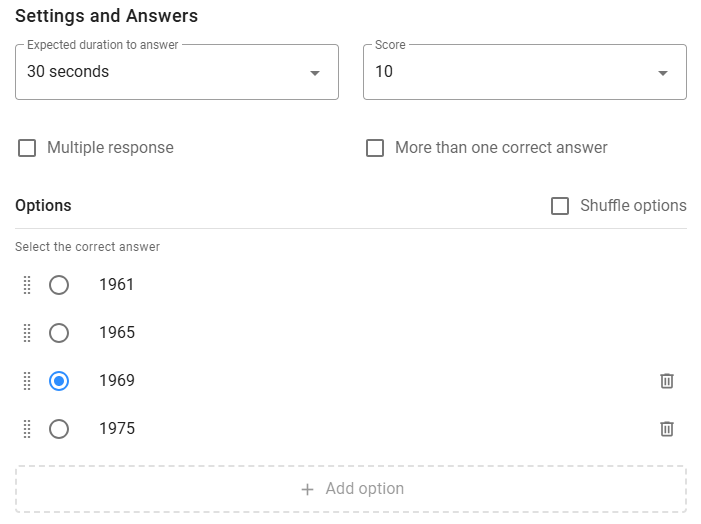
This question type requires candidates to select one or multiple answers from a list of available options. You can define any number of options, though a range between 3 and 6 is recommended, with at least 2 options required. Use the Add option panel to add a new option, the Dots icon to reorder options by dragging and dropping them, and the Delete icon to remove options. To edit an option, simply click on the text and type.
Tick the options that will be considered correct when scoring answers. At least one option must be ticked as correct, but the number will depend on additional settings. The available settings are as follows:
- Expected duration to answer: By setting an expected duration for each question, the system can compare the total expected duration of all questions with the time limit assigned to the entire test and alert you if there is a significant difference.
- Score: For tests where the option Questions can have different scores is selected, you can assign a value from 1 to 10 based on the complexity of the question and the weight it should carry toward the total score.
- Multiple response: This setting defines whether the question is single-choice or multiple-choice, displaying radio buttons or checkboxes to candidates accordingly.
- More than one correct answer: For single-choice questions, tick this box if there is more than one correct answer. In this case, you can select multiple options as correct. Note that when there is more than one correct answer, candidates only need to select one correct option for their answer to be considered correct.
- Number of responses required: For multiple-choice questions, you may specify the number of correct options candidates need to select for their answer to be considered correct. Note that if candidates select any option that is incorrect, their answer will be marked as incorrect, regardless of the other selections.
- Shuffle options: Tick this box if you want the options to be randomly shuffled before being displayed to candidates.
Multiple images
Similar to Multiple options, except options are images. When candidates view the question, they can enlarge images if the display size is smaller than the actual resolution.

Short Text
Short text questions offer the advantage of precise, straightforward answers that are easy to evaluate, making them ideal for assessing specific knowledge or factual recall. This format is especially useful for questions with clear, objective answers, such as dates, names, or definitions, as it limits ambiguity and reduces subjectivity in scoring. Short text questions can also streamline the candidate's experience, allowing them to focus on key details without the need to elaborate, which makes the assessment quicker and easier to complete and review.
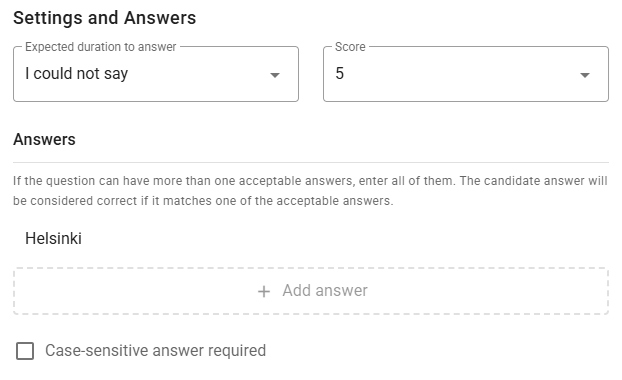
At least one correct answer is required, though it’s possible to add more than one. When scoring, if the candidate’s answer matches any of the specified correct answers, the response will be considered correct. By default, answers are compared in a case-sensitive manner, but you can specify case-insensitive comparison by ticking the corresponding box.
Common settings include Expected Duration and Score.
Coding
Coding questions enable direct assessment of a candidate’s programming skills, problem-solving abilities, and coding efficiency—essential for technical roles. Coding questions allow hiring teams to evaluate not only if a candidate can write correct and efficient code, but also how they approach challenges and implement logic under test conditions. This hands-on approach closely simulates real work scenarios, providing a more accurate picture of the candidate's technical proficiency and readiness for the role than theoretical questions alone could offer.
Ensure that the coding problem defines the objective clearly, articulating in precise terms what the candidate needs to do. This clarity helps candidates understand the task quickly and accurately. A well-defined problem statement allows candidates to focus on solving the problem efficiently rather than deciphering what is required. This approach not only ensures a fairer assessment but also mirrors real-world scenarios where clear requirements are essential for successful project outcomes. Additionally, it is important to provide a few examples of input and output that satisfy the requirements, including all relevant details. Optionally, you can add potential hints or other considerations.
In Zamdit, coding questions require candidates to solve a problem in the form of a function that receives parameters and returns an answer. Answers are automatically checked using test cases that you define while setting up the question.
The question setup requires defining four sections. Let's use the following coding problem to better understand the process. The coding language is TypeScript.
Coding Problem
Given an array of integers, numbers, in the range [-1000, 1000], determine if there exists a pair of non-zero, opposite numbers within the array (i.e., a number x and its opposite -x, where x ≠ 0).
Example 1:
Input: [1, 2, 3, 4, 5]
Output: false (no opposite numbers)
Example 2:
Input: [2, -3, -4, 3, 6, 1]
Output: true (since 3 and -3 are opposite numbers)
Example 3:
Input: [4, -1, 3, 8, -2, -7]
Output: false (no opposite numbers)
Constraints:
-1000 <= numbers[i] <= 1000- The array contains at least one element.
Notes:
Exclude 0 in your search for opposite pairs; pairs like [0, 0] do not count as valid opposite numbers.
Function Signature
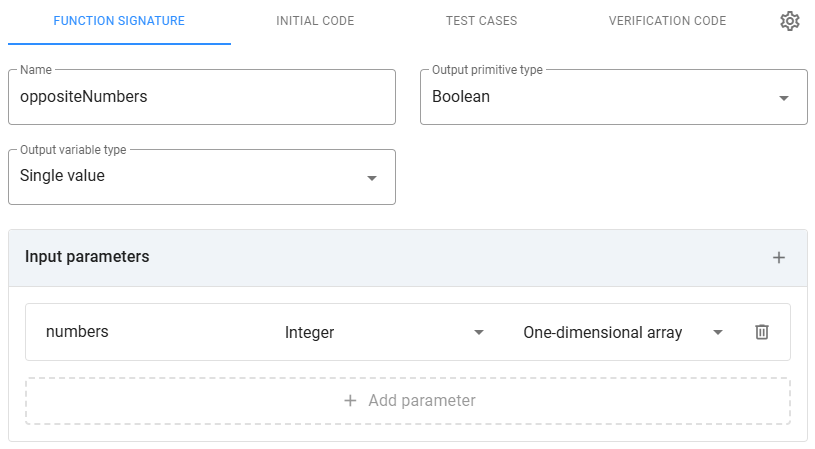
Here you define the basic details of the function that must be implemented.
Name: The function name, which must be a valid identifier. You can write it in any case style when defining it, and the system will adapt it to the correct convention for the selected programming language.
Output Primitive Type: One of the following types:
- Integer
- String
- Float
- Boolean
- Double
Output Variable Type: The dimension of the output parameters for the primitive type. One of the following types:
- Single value
- One-dimensional array
- Two-dimensional array
Order Matters: If the variable type is a One-dimensional array, check the box to specify that the order of the items in the answer must match the order of the expected items. Otherwise, the system will only check that the answer array and the expected array contain the same values.
Input Parameters: Specify each function input parameter by name, primitive type, and variable type. The parameter name must be a valid identifier for the coding language. Primitive and variable types support the same values as the function output.
⚠️ Note
Objects are not supported as function parameters or outputs.
Initial Code
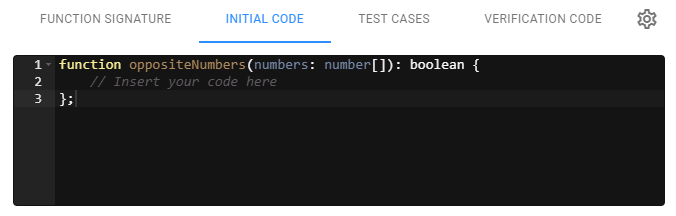
The initial code provides the starting point for candidates. It shows the function signature, which is automatically generated from the specifications in the previous section. You can add extra code as a starting point if required by the task. Ensure that you do not remove the sections where candidates are expected to insert their own code.
Test Cases
Test cases consist of combinations of input and output parameters that satisfy the requirements you've specified in the question. For each test case, you must specify whether it will be available to candidates. When the box is checked, it means the test case will be used during the assessment when the candidate runs tests to check their code, assisting them in completing the coding task successfully. Once the answer is submitted, all test cases—including those available to candidates—are used for validation. Test cases used only for validation should cover all requirements laid out in your scenario, including exceptions, corner cases, etc. Depending on the complexity of the question, we recommend creating between 8 and 15 test cases and selecting between 2 and 5 to be available for candidates to use during the assessment.
Test cases are executed one by one, using the input parameters specified for the test case. If the candidate's code returns a result that matches the expected output for a test case, the test case is considered passed. When the candidate runs the test cases, they will receive feedback on the result of each test case. Additional information, such as compiler errors, is only provided based on how the assessment is set up.
The final score for the question is calculated by computing the percentage of passed test cases. A detailed report will be available for the hiring team and any reviewers invited to assess the candidate's solution.
Enter all your test cases by clicking on the Add Test Case panel. The system will assign a name to the test case, but you can rename it. To rename a test case, click on the name and type the new one. You can delete a test case by clicking the Delete icon. To reorder test cases, drag and drop them using the Dots icon.
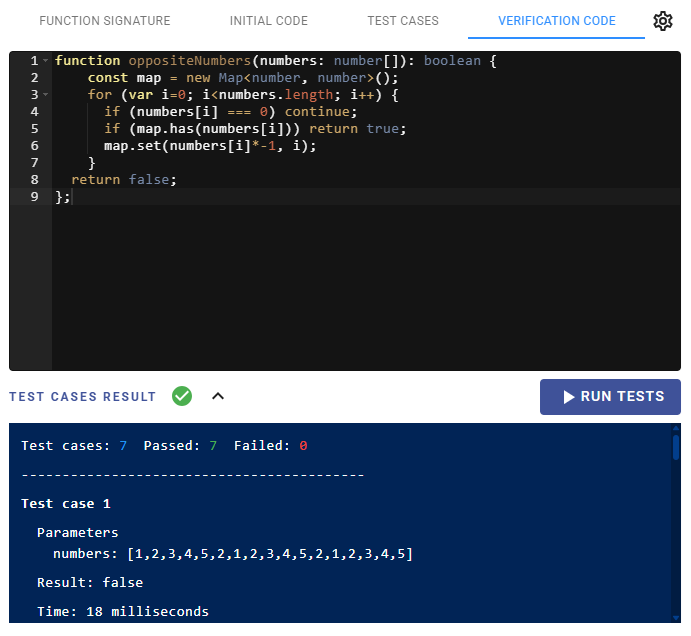
Each entry will include an input box for each input parameter, one for the output result, and one for the time limit. The input box will vary depending on the primitive and variable type. The expected time limit is optional and not used by the system to calculate the final score. It is intended for reviewers to compare how long it took to run a test case against the expected time, particularly for coding tests where scalability is important. Note that you will have an estimated runtime when running the test using the verification code.
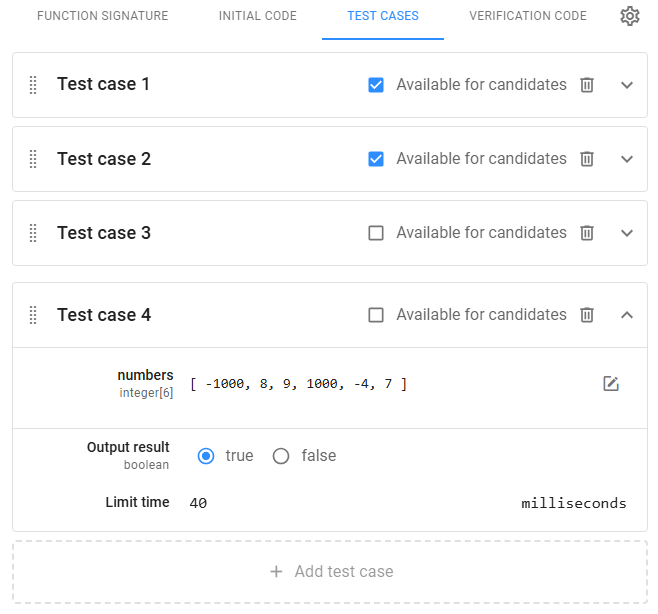
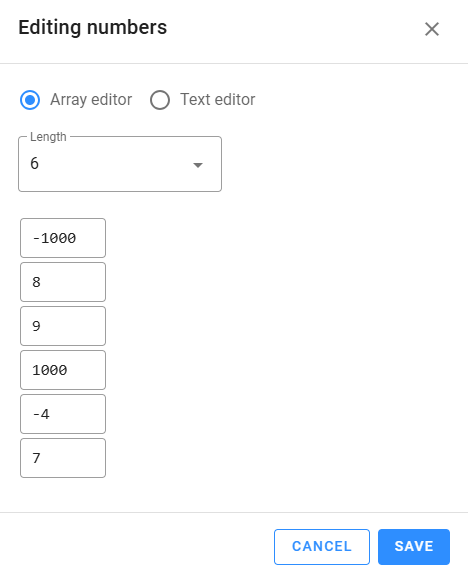
Array values (one- and two-dimensional) are entered using a special editor that supports two modes: Array Editor and Text Editor. The first mode is useful for short arrays, while the second mode is designed for longer arrays. The text editor mode allows entering arrays in JSON notation and also allows pasting from the clipboard.
Verification Code
The verification code is essentially the model answer. You must write it and run it to ensure that all test cases you entered are passed. You can save the question without running the test cases, but the test cannot be published until all coding questions have passed all the test cases.
SQL
SQL questions are a specific type of coding question for SQLite, requiring candidates to write a query. These questions support SELECT, INSERT, UPDATE, and DELETE queries. The setup for SQL questions is slightly different due to the additional database component involved.
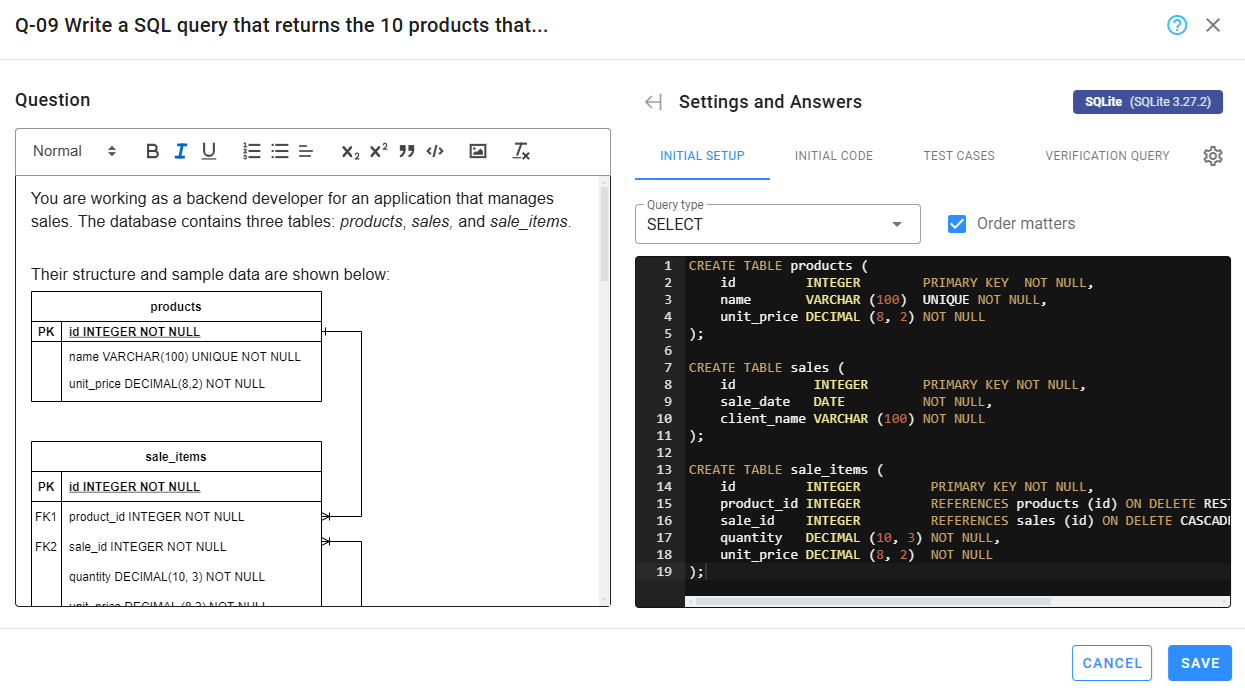
The question setup consists of four sections. Let’s use the following SQL problem to illustrate the process. The problem requires writing an UPDATE query, and its setup is slightly more complex than the one for SELECT queries. This is because test cases require not only the script to insert data but also a SELECT query to compare the results of the candidate's query with the ones produced by the verification query. After explaining the sections, we will walk through the flow Zamdit uses to check the candidate's code for each test case.
Coding problem
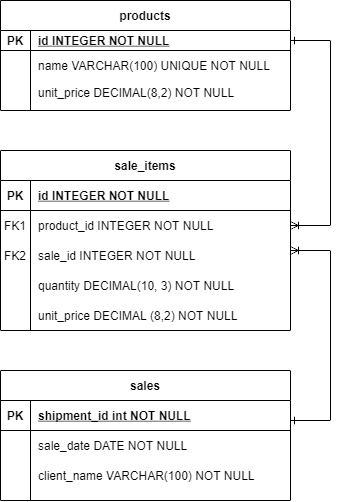
You are working as a backend developer for an application that manages sales. The database contains three tables: products, sales, and sale_items.
Their structure and sample data are shown below:
Sample data for table products:
| id | name | unit_price |
|---|---|---|
| 1 | Paper A4 x 500 | 5.60 |
| 2 | Ballpoint x 10 | 2.50 |
| 3 | Stapler | 2.30 |
Sample data for table sales:
| id | sale_date | client_name |
|---|---|---|
| 1 | 2022-01-06 | Flexible Solutions |
| 2 | 2022-01-07 | Coastal Investors |
| 3 | 2022-01-07 | Zany Solutions |
Sample data for table sale_items:
| id | product_id | sale_id | quantity | unit_price |
|---|---|---|---|---|
| 1 | 1 | 1 | 4 | 5.70 |
| 2 | 6 | 1 | 2 | 3.65 |
| 3 | 12 | 2 | 3 | 2.25 |
Task:
Write a SQL query that updates the prices of the 10 products that have historically generated the most revenue by increasing their prices by 10%.
Notes:
- The data provided is only sample data; the actual database contains many more rows, and your query should account for all of them.
- Revenue is calculated as the sum of
quantity * unit_pricefor each product insale_items. - Only products that have recorded sales should be considered.
- Product names are unique.
- Prices of products can change over time, so the
unit_priceinsale_itemsrepresents the price at the time of each sale. - If two or more products have the same revenue, order them alphabetically by product name (A-Z).
- The query should apply the update in the
productstable, which stores the currentunit_price.
Initial setup
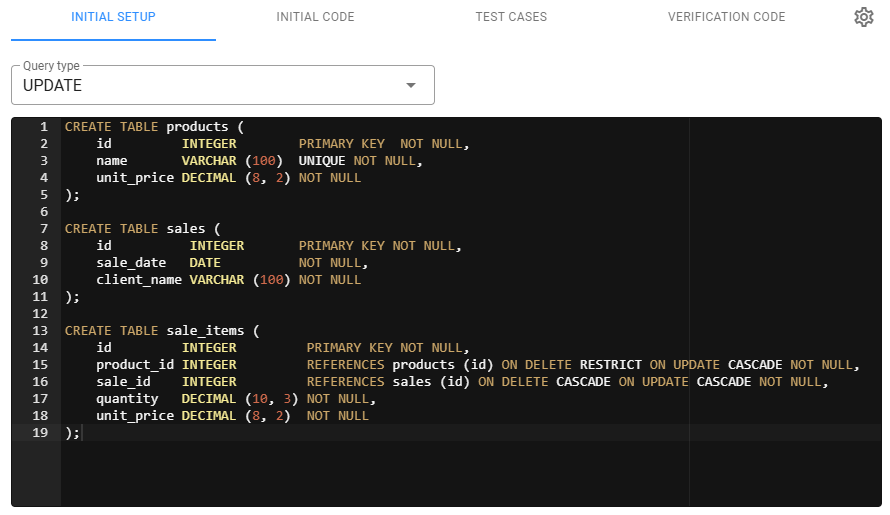
The first step is selecting the type of query from the four supported options: SELECT, INSERT, UPDATE, and DELETE. When the query type is SELECT, check the Order matters box to specify that the order of the resulting records when running the candidate's query must match the order of the expected records from the verification query. Otherwise, the system will only check that both datasets contain the same records, regardless of order. This option is important when the question requires the records to be returned in a specific order.
Next, provide the initial database script, which will create the database structure and insert common records for all test cases. Including the database structure in the question description is essential, as candidates will need to understand how the database is structured and what type of information is stored. It may also be helpful to provide the database's Entity Relationship Diagram.
Initial code
The initial code is the starting point for candidates. For SQL problems, it is usually empty. However, depending on the complexity of the problem, you might want to include some lines of code, such as the basic structure of the query or comments that could guide candidates toward the solution.
Test cases
Test cases function similarly to those in coding questions, but the structure differs. When writing test cases, you must insert additional values into the database in the Test case setup. This setup is a script that will run immediately after creating the database structure but before executing the candidate's code.
For data manipulation queries, a Checking query is also required. This is a SELECT query executed after the candidate’s code to retrieve the dataset that will be compared with the result obtained from executing the test case setup and the verification code. If both results match, the test case passes.
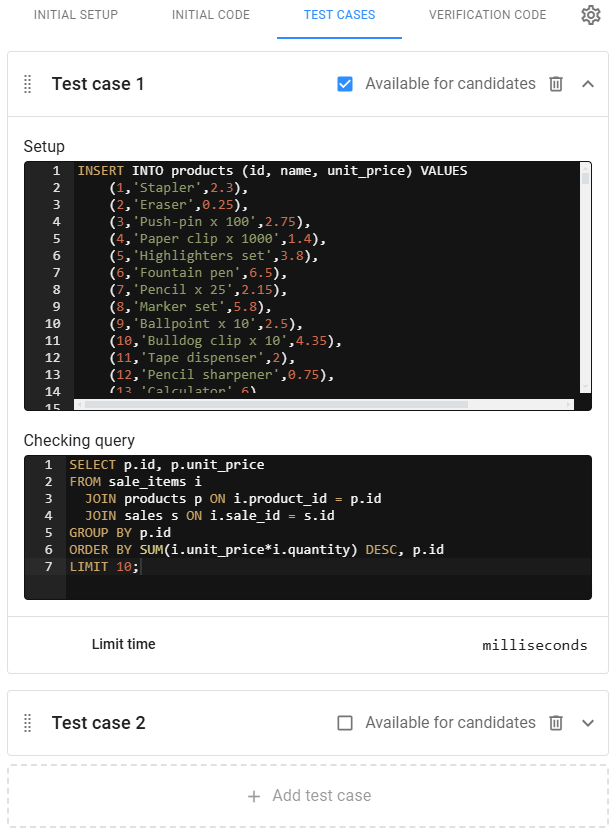
Note that every test case recreates the database, so they are isolated from one another.
Verification code
The verification code works the same way as in other coding questions: it represents the model answer and should be clean and efficient. After completing the question setup, you should run the tests using the verification code to ensure all test cases pass. The test cannot be published until all coding questions pass all test cases.
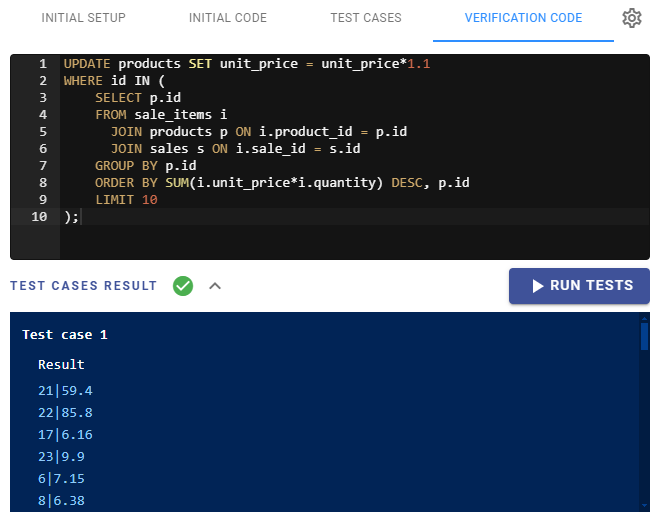
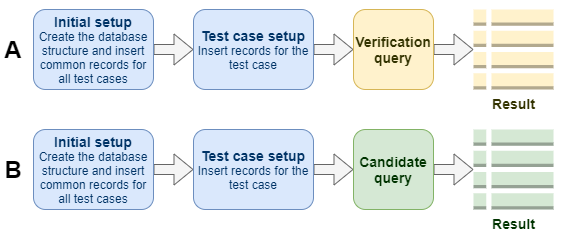
For a better understanding of how to set up SQL coding questions, let’s see how Zamdit uses all the settings and in which order. Since test cases are isolated from each other, we will focus on a single test case.
For SELECT queries, the verification query is used to obtain the expected results (A). These results are stored when you run the test cases at the end of the question setup process. When candidates take the test, their code (B) is used to generate the resulting dataset.
For Data Manipulation queries, the process is similar, but the checking query is used to obtain the final results as datasets.
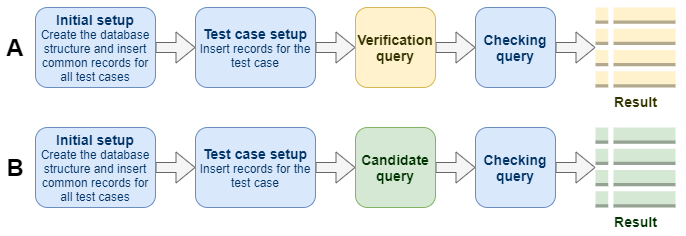
In both cases, the results from A and B are compared. If they match, the test passes; otherwise, it fails.
Long text
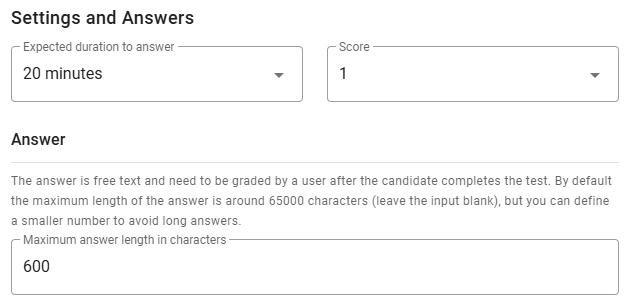
Long text questions, also known as open-ended questions, allow candidates to demonstrate a deeper understanding, critical thinking, and the ability to articulate ideas. They are particularly valuable for assessing complex skills such as problem-solving, communication, and analysis. This format provides insight into how candidates approach challenges, reason through their answers, and express themselves. It is especially useful for roles that require creativity or a nuanced understanding. However, long text questions also come with certain challenges: they are time-consuming to answer, can introduce variability in responses, and require more effort to evaluate, often necessitating manual review. Additionally, due to the wide range of possible responses, there is a risk of subjective scoring, which can impact consistency in evaluations.
When using Long text questions in a test, the final test score is not computed until the question has been manually graded. However, Zamdit allows for internal or external reviewers to assess the responses before a final mark is provided. Unlike other types of questions, long text answers can be assigned a score ranging from 0 to the maximum score assigned to the question.
In addition to common settings such as Expected duration to answer and Score, you can limit the maximum number of characters for answers.