
Pipeline - Interview Evaluations
Interview evaluations are designed to standardize the assessment of candidates during interview stages. By using structured evaluation forms, hiring team members can consistently rate candidates on predefined criteria such as skills, qualifications, cultural fit, and more. This approach ensures fair and objective comparisons, making it easier to identify the best candidates for the role. Evaluations also provide a centralized record of feedback for each candidate, which can be referred to at any time throughout the hiring process.
The section is named depending on the stage type:
- Evaluation for Interview Questionnaires, as there's no need to define the duration, because it's not a proper interview.
- Interview for Phone Screens stages, as it's a single phone interview.
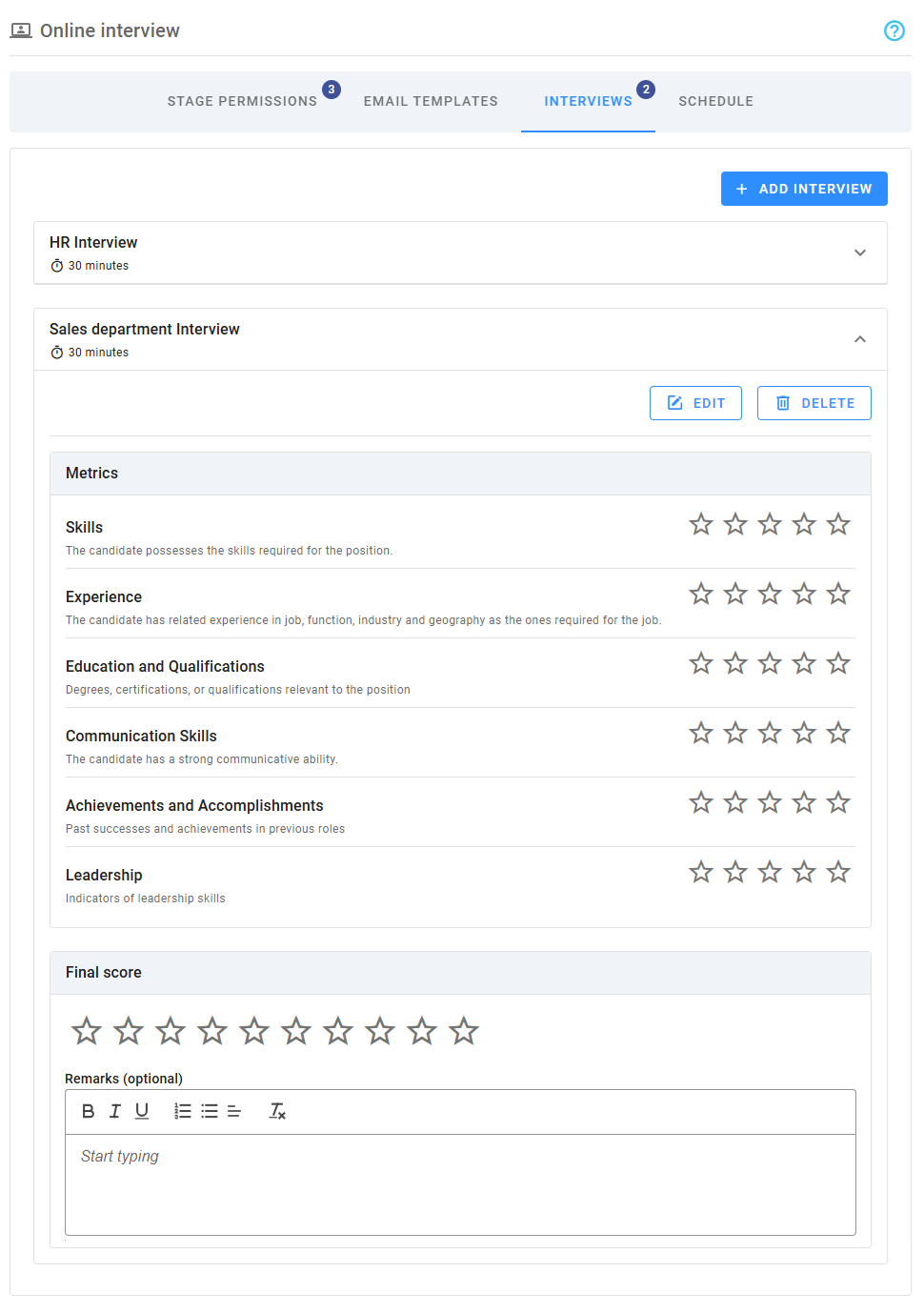
- Interviews for Online and Onsite Interviews and Onsite Assessments, as these stages support multiple interviews. A badge with the number of interviews is shown on the tab.
Except for the Interview Questionnaire stages, in all the other cases, it's required to specify the duration of each interview and the evaluation form to use. Each interview requires an evaluation form that can be customize to ensure that it focuses on the most critical attributes for success. These forms ensure a data-driven, consistent, and collaborative approach to candidate evaluation.
Overview
When you create a pipeline from a template, stages that require interview evaluations can be pre-populated from their corresponding settings that could define the Interview Evaluation Template to use. When no template was configured or when a new stage is added, the system will assign by default, a duration of 30 minutes and an empty evaluation, although note that all evaluations implicitly include a final score (out of 10) and a free text for optional remarks.
Interview evaluation forms can contain scorecards (referred to as Metrics in Zamdit) and specific questions, and although they are optional, it's recommended to include them in the evaluations to assess candidates' specific skills, competencies, and attributes relevant to the position, enhancing the accuracy and relevance of evaluations.
The section will display each interview duration (when applicable), and a preview of the corresponding evaluation. When the stage support multiple interviews, you can add new ones, or delete any additional one you had previously added. Note that when the stage support multiple interviews, the interviews can be collapsed.
Add and edit evaluations
Interviews are edited in a popup window, where you can use the buttons at the left bottom to select and load one of the available templates, and also to preview it as it will be displayed to team members. The preview feature allows you to see the layout and flow of the evaluation, ensuring it is clear and functional before it’s used.
The edition interface that has three sections.
General details
This section includes three fields:
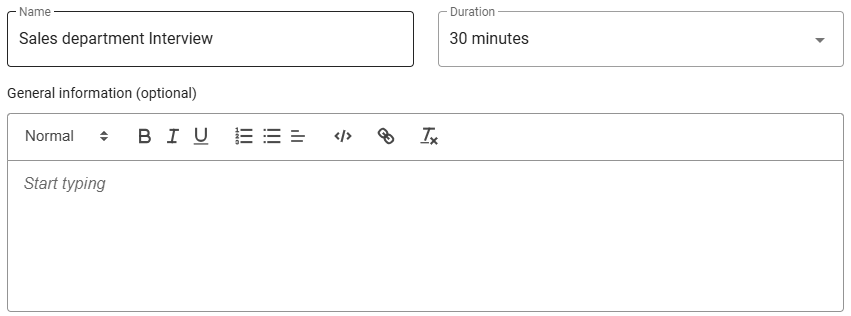
- Name: Name to identify the interview, editable when the stage supports multiple interviews, otherwise the stage name is used.
- Duration: Pick one of the available duration options for the interview.
- General information: free text for a general overview of the evaluation. This information will be displayed to team members, helping establish a shared understanding of the evaluation's purpose, scope, and competencies to assess. A well-defined overview reduces ambiguity, promotes consistency in scoring, and supports clear communication among evaluators.
Metrics
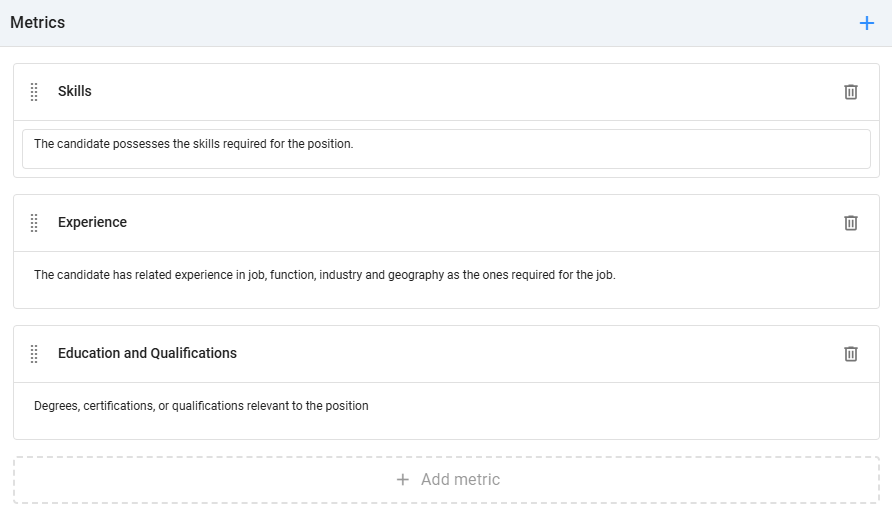
Add all the metrics relevant to the evaluation. Each metric uses a star rating scale from 1 to 5, with the option to select half-star ratings. You can also add an optional description for each metric, which will appear below its name to provide additional context for evaluators. To remove a metric, click the Delete icon to the right. To reorder metrics, drag and drop them using the Dots icon.
Questions
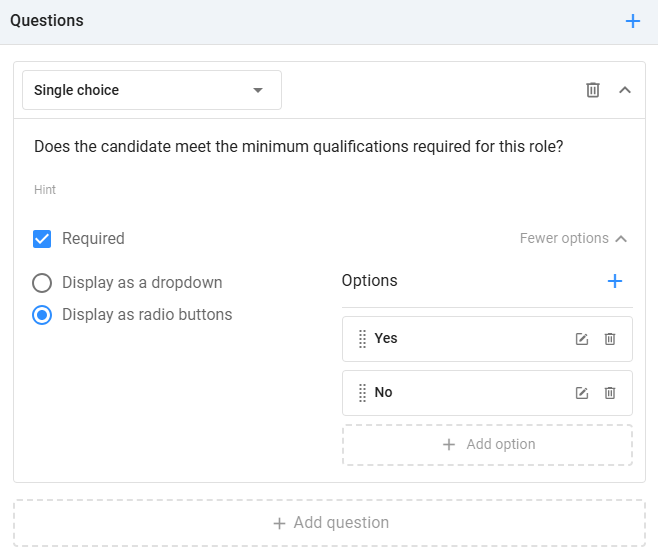
Zamdit supports various question types: Checkbox, Number, Date, Single choice, Multiple choice, Single-line text and Multiple-line text. For each question, you can also define an optional description to clarify its purpose and indicate if it’s mandatory. For choice questions, at least two options are required, and you can select the UI component type (dropdown, checkbox, or radio button). To remove a question, click the Delete icon to the right. To reorder questions, drag and drop them using the Dots icon.
Best practices for defining metrics and questions
When creating interview evaluations, it’s important to ensure that the metrics and questions are well-defined and relevant to the role. Here are some best practices to help you design effective evaluation forms:
Align Metrics with Job Requirements
Ensure that the metrics reflect the key competencies required for the role. Focus on aspects like technical skills, problem-solving ability, communication skills, and cultural fit. By aligning metrics with the job requirements, you ensure that your evaluations are relevant and objective, making it easier to compare candidates' strengths and weaknesses.Use Clear, Actionable Metrics
Each metric should be clear, measurable, and actionable. Avoid vague terms like "good" or "bad." Instead, use specific descriptions that can be objectively rated. For example, instead of "communication skills," consider using "clarity and structure of responses" or "ability to articulate complex ideas." This makes it easier for interviewers to assess candidates consistently.Incorporate Both Quantitative and Qualitative Feedback
While scores provide valuable insights, qualitative feedback is essential for providing context and depth to the evaluation. Include open-ended questions in the evaluation form that allow interviewers to provide detailed feedback on a candidate’s performance. This feedback helps provide a clearer picture of a candidate's strengths and potential areas for development.Focus on Core Competencies
Rather than creating a long list of metrics and questions, focus on the core competencies that are most important for the role. Identify the top three to five areas of focus, and ensure that the metrics and questions capture these aspects. This makes the evaluation more focused and allows for better decision-making.Ensure Consistency Across Interviewers
When multiple interviewers are involved, ensure consistency in the evaluation process by defining standard metrics and questions. This helps prevent subjective bias and ensures that all candidates are evaluated based on the same criteria. You can also include calibration sessions where interviewers align on how they rate candidates, ensuring consistency in the evaluation process.Avoid Leading or Biased Questions
Make sure that the questions you ask are neutral and unbiased. Leading questions (e.g., "How did you handle that challenging situation?" implying that the candidate has handled a challenging situation) can result in biased responses. Instead, ask open-ended questions that give candidates the opportunity to share their experiences in their own words.
By following these best practices, you can create effective and objective interview evaluations that help identify the best candidates while minimizing biases and inconsistencies in the hiring process.