
Vote for a Candidate
Using a voting system as a collaboration tool allows hiring teams to make balanced and democratic decisions during the hiring process. In Zamdit, the Voting System enables team members to cast votes for candidates at each stage, manage the number of votes allocated per person, and use a Voting Summary to review decisions and progress candidates effectively.
Enabling Voting
Voting can be enabled for individual stages of the hiring pipeline while configuring the job's settings. Here’s how:
- Navigate to the Job Edition View for a specific job (before publishing the job).
- Edit the pipeline and enable voting for the desired stages.
- Optionally, specify the Maximum Votes per Member for each stage.
Key Considerations:
- Stage-Specific Flexibility: Voting is customizable for each stage, letting you decide where it adds the most value.
- Inclusivity: All hiring team members can vote, regardless of their permissions for the specific stage.
- Strategic Application:
- Ideal for Collaborative Stages: Post-interview stages or final decision-making steps benefit the most from voting.
- Less Useful for Objective Stages: Automated assessments or initial screenings may not require voting.
Casting a Vote
To vote for a candidate:
- Open the Candidate Details View or find the candidate in the Candidate Cards List for the relevant stage.
- Click Vote for this candidate from the actions menu.
- Candidates must meet the following conditions to be eligible for voting:
- Voting is enabled for the stage.
- The candidate has completed all pending actions.
- You have remaining votes for the stage.
- You haven’t already voted for that candidate.
- Candidates must meet the following conditions to be eligible for voting:
Identifying Voting Status:
- Blue Icon : You’ve already voted for this candidate.
- Gray Icon : You haven’t yet voted for this candidate.
Best Practices for Voting:
- Timing: Vote only after completing evaluations or assessments for the stage, ensuring your decision is based on all available information.
- Coordination: Establish a clear team strategy for voting deadlines. Ensure candidates aren’t moved prematurely, as votes cannot be cast once a candidate progresses to the next stage.
⚠️ Important
Votes cannot be edited or removed once submitted. Ensure your decision reflects your evaluation accurately.
Voting Summary
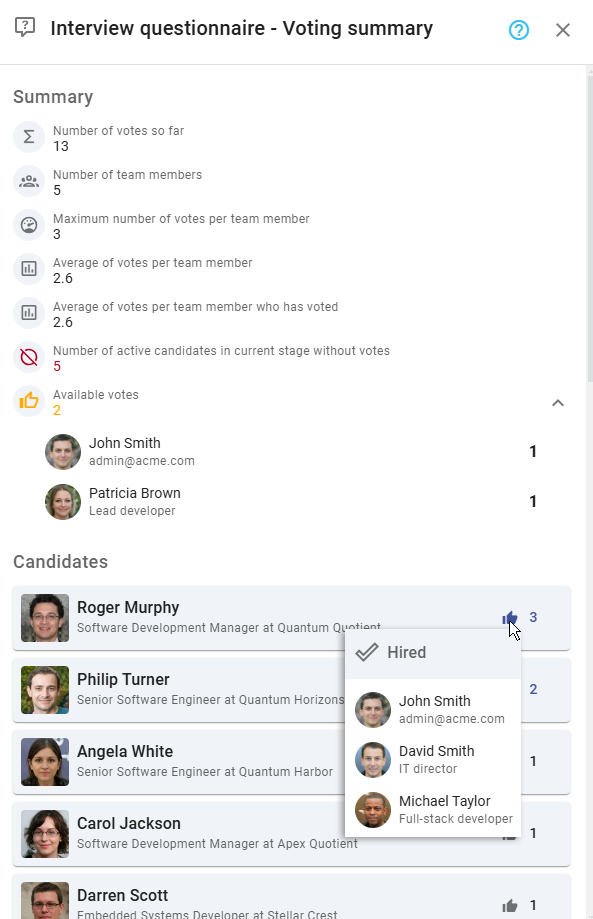
The Voting Summary tool provides an overview of all votes cast within a stage, offering insights to help teams align on decisions.
Features of the Voting Summary:
- Stage-Level Metrics:
- Total votes cast so far.
- Maximum votes allowed per team member (if applicable).
- Remaining available votes for team members.
- Number of active candidates without any votes.
- Candidate-Level Insights:
- A sorted list of candidates with the total votes they’ve received, showing candidates with the most votes first.
- Hover over the vote icon to view which team members have voted for a candidate.
To access the Voting Summary:
- Go to the stage where voting is enabled.
- Click the Voting Summary option from the stage column header's action menu.
By leveraging the Voting System in Zamdit, hiring teams can enhance collaboration, ensure fairness in candidate evaluations, and confidently make informed decisions.