
Request a Question Answer Review
Requesting reviews for candidate answers is an essential step in ensuring a fair and thorough assessment process. While automated grading handles some aspects, human reviewers provide critical insights into the quality, depth, and relevance of a candidate's responses.
In Zamdit, you can request reviews for specific candidate answers, such as those to open or coding questions. These reviews are especially valuable for roles requiring nuanced evaluation. Depending on the complexity of the question and the role’s importance, multiple reviews may be appropriate to gain a balanced perspective.
Open Questions
Requesting a Review
To request a review for an open question answer:
- Open the candidate's submission in the assessment results.
- Locate the specific open question.
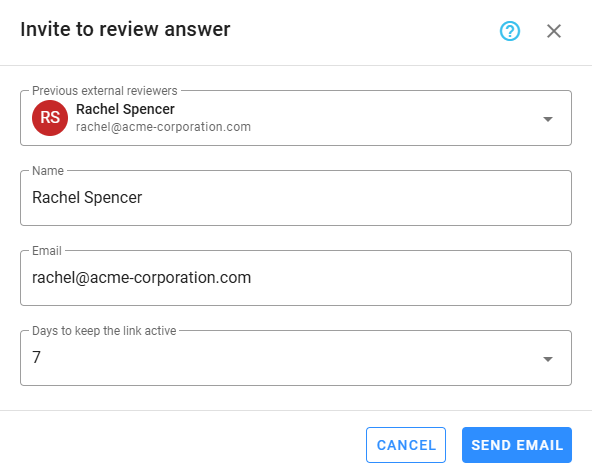
- Click Invite to Review.
- Choose an external reviewer from the list or invite a new one.
- Set a deadline for the reviewer to complete their review.
The invited reviewer will receive an email with a link to access the review page. They will see:
- The candidate’s name (for identification purposes only).
- The question text and any reviewer instructions.
- The candidate’s submitted answer.
Guidelines for Reviewing Open Questions
When requesting a review, consider the following:
- Set clear evaluation criteria: Communicate key aspects such as relevance, clarity, depth, and originality.
- Provide reviewer guidance: Include examples or benchmarks for strong and weak responses if applicable.
- Tailor reviews to the role: Highlight specific competencies or qualities the answer should reflect, such as problem-solving, creativity, or alignment with job requirements.
External reviewers provide valuable feedback on candidates’ critical thinking, communication skills, and ability to respond thoughtfully to open-ended challenges.
Coding Questions
Why Review Coding Question Answers?
While Zamdit grades coding questions automatically based on predefined test cases, manual review by senior developers or subject-matter experts is equally important. Automated grading checks functionality, but human reviewers can assess:
- Readability: Is the code easy to follow and maintain?
- Structure and organization: Does it follow best practices?
- Efficiency: Is the solution optimized for performance?
- Problem-solving approach: Does it demonstrate logical thinking and creativity?
- Edge cases: Are potential errors or unusual inputs handled effectively?
This review ensures candidates’ coding abilities align with the expectations for the role, particularly for technical or senior-level positions.
Requesting a Review
To request a review for a coding question answer:
- Open the candidate's submission in the assessment results.
- Locate the coding question.
- Click Invite to Review.
- Assign the review to a senior developer or subject-matter expert.
- Set a deadline for the reviewer to complete their review.
The reviewer will receive an email with a link to access the review page. They will see:
- The candidate’s name (for identification purposes only).
- Reviewer instructions (if applicable).
- An interactive tool that displays the question and a timeline for reviewing how the code was written, along with test case execution results and errors.
Guidelines for Reviewing Coding Questions
When requesting a review, ensure the following:
- Context: Share details about the role and the level of expertise expected.
- Key evaluation points: Encourage reviewers to assess not only correctness but also qualitative aspects such as code clarity, scalability, and efficiency.
- Actionable feedback: Ask reviewers to provide constructive comments, highlighting strengths and suggesting areas for improvement.
By incorporating external reviewers in the assessment process, Zamdit helps you evaluate candidates comprehensively and objectively. Clear guidance and expert insights lead to better hiring decisions, ensuring you identify the most qualified candidates for your organization.