
Career Portal
Zamdit empowers organizations to create a fully customized Career Portal that aligns with their brand identity and recruitment objectives. Serving as a central hub for showcasing open positions and receiving applications, the portal delivers a seamless, branded experience for candidates while helping organizations attract top talent and maintain a professional online presence.
Designing the portal
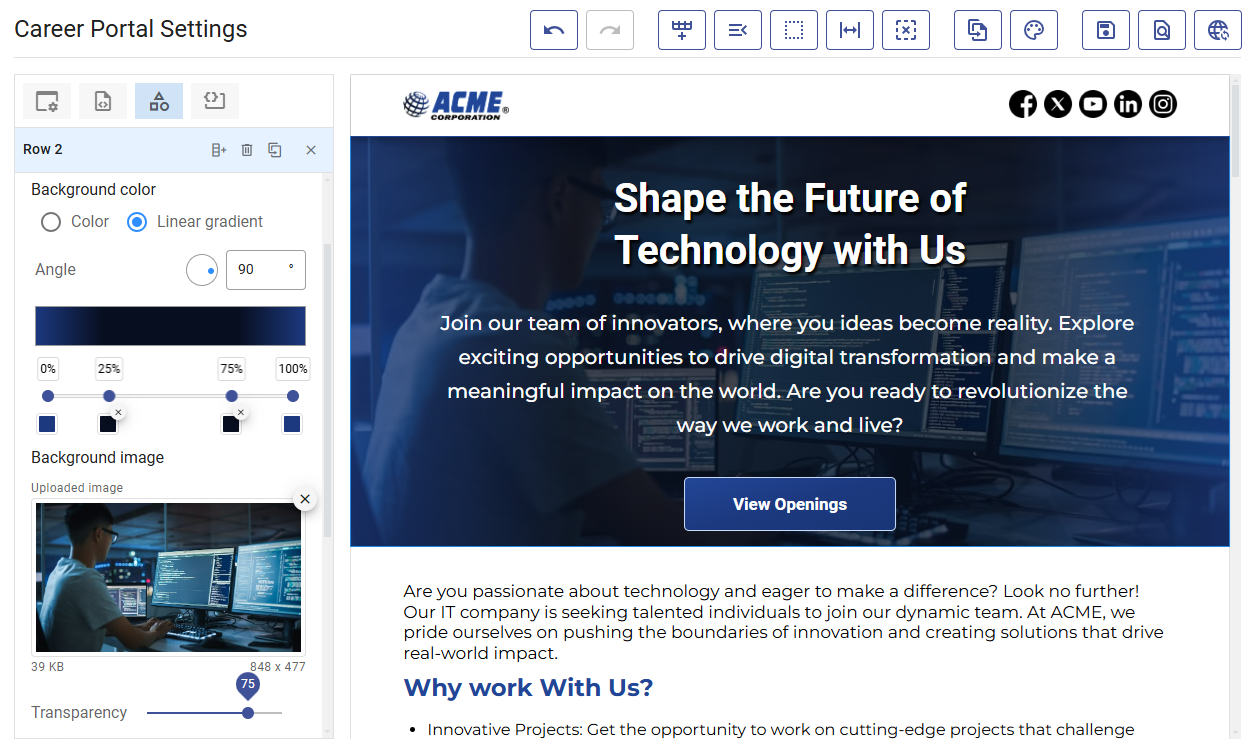
Zamdit includes the Portal Designer, a no-code tool that enables organizations to build and customize their Career Portal effortlessly, without requiring technical expertise. To access the designer, navigate to Career Portal Settings in the avatar menu, available by clicking your avatar in the toolbar.
This intuitive, drag-and-drop interface allows users to design every aspect of the portal, from incorporating branding elements like logos and colors to displaying job listings. Organizations can quickly adapt their portals to evolving recruitment needs, ensuring a professional and engaging candidate experience with minimal effort.
The Portal Designer supports creating page layouts by adding rows and columns, then dragging and dropping elements into position. Built-in elements include headings, text blocks, images, videos, social links, buttons, image galleries, dividers, job listings, and a special element for custom HTML.
Each element is fully customizable using intuitive tools for appearance settings and a rich text editor for content formatting. The designer supports responsive design, ensuring your portal looks and performs flawlessly on any device.
For detailed instructions, see Designing Your Portal.
Promoting open positions
Your Career Portal is the central location for showcasing open positions to prospective candidates. Use engaging visuals, employee testimonials, and detailed insights into your company culture to make your portal more attractive and inviting. Adding the Jobs element to your portal ensures all public open positions in Zamdit are automatically listed.
For more information, see Promoting Open Positions.
Publishing your portal
Once you have finalized your portal's design and configuration, you can prepare it for launch by setting up SEO settings and adding meta tags to optimize visibility.
To strengthen your brand identity and professionalism, use a custom domain for your Career Portal. A custom domain aligns the portal’s URL with your organization’s branding, creating a cohesive and trustworthy experience for candidates. Zamdit supports custom domains for organizations subscribed to the Standard plan or higher.
To learn how to take your portal live, see Publishing Your Portal.