
Test Status
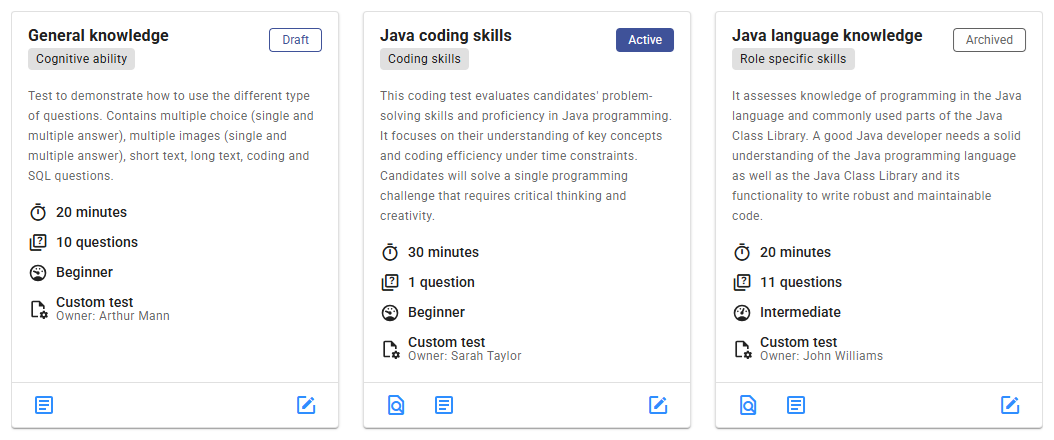
In Zamdit, custom tests can have three different statuses: Draft, Active, and Archived. The test status appears at the top-right of test cards and in the overview section when editing a test. By default, Archived tests are hidden from the main test list, but you can include them by selecting Status in the filter options.
The Test Editor’s top bar provides actions to change a test’s status. Here, you can also preview the test, change the test owner (if you are an Admin user), clone the test, and delete unpublished tests.

Draft
A test begins in Draft status, where it remains fully editable. Only the test owner or an Admin user can make edits at this stage. While in draft, all users can view the test’s details and preview any sample questions, allowing teams to provide feedback before the test is published.
Previewing a test before publishing is highly recommended to ensure it meets all requirements. The preview simulates the candidate’s view, letting you confirm the question flow, layout, and overall presentation.
While in Draft, a test can be deleted if it's no longer necessary. However, once a test is published, it cannot be deleted, only archived.
Active
Once published, a test moves to Active status, and editing becomes restricted to specific fields: Summary, Description, and Information about Relevant Roles. This limitation ensures consistency and fairness by maintaining a standard assessment for all candidates.
If an active test requires significant updates (e.g., due to outdated content), you can create a new version by cloning the test. This preserves the original version for current candidates, while allowing you to update questions and other test elements in the cloned version. To avoid confusion, consider archiving the older version after creating the updated one.
Only Active tests can be added to assessments when setting up a job. Archiving an active test that’s in use will not disrupt any existing assessments.
Archived
Tests that are no longer needed, typically due to an updated version, can be moved to Archived status. Archived tests are excluded from the default test list and cannot be selected for new assessments. However, you can include them in your test list by filtering for Archived status.
While in Archived, tests cannot be edited, even in internal fields. However, archived tests can be reactivated if needed in the future.