
Job Edition - General Details
The General Details section is the first page you see when creating a job, and it must be completed and saved before accessing other sections. This form captures essential information about the job, generating the view presented to candidates and external recruiters.
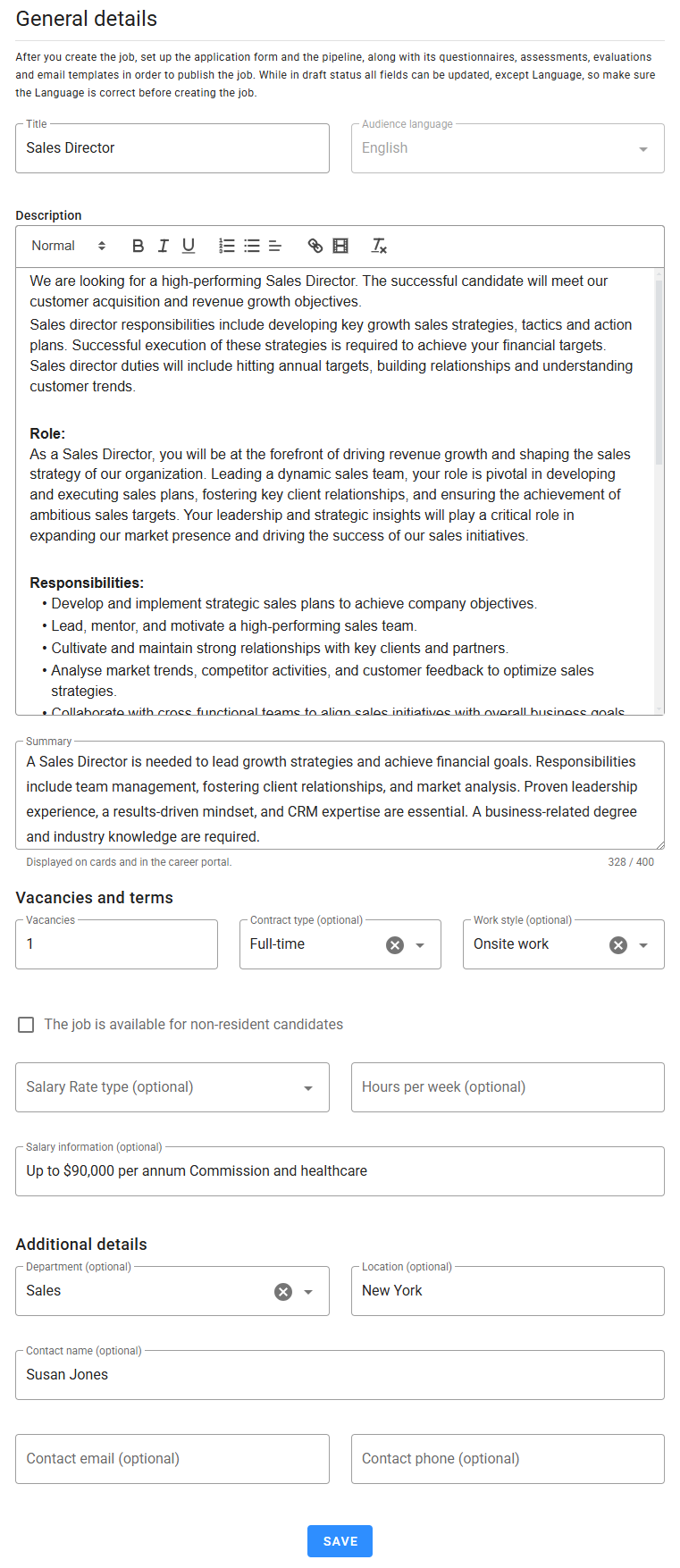
Overview of Fields
Here’s a detailed explanation of each field in the General Details form:
Job Title
- Use clear and concise titles that accurately reflect the role.
- Avoid jargon or overly creative titles that may confuse candidates or hinder searchability.
Audience Language
- A dropdown to select the job's audience language.
- All views presented to candidates during the hiring process will be displayed in this language.
- Only templates and tests matching the selected language can be used in other sections.
- Once the form is saved for the first time, the Audience Language cannot be changed to ensure compatibility with the other sections.
Description
Craft a compelling job description to attract top talent. It sets expectations and ensures only qualified individuals apply. Follow these best practices:
- Job Summary: Provide a brief overview of the role, its purpose, and its contribution to the company.
- Responsibilities: Use bullet points starting with action verbs (e.g., Develop, Coordinate). Limit the list to 6–8 primary tasks.
- Requirements: Distinguish between essential and preferred qualifications (skills, experience, certifications).
- Company Culture: Highlight your company’s mission, values, and unique benefits like flexible work options or diversity initiatives.
- Compensation: If possible, include salary details or highlight competitive benefits.
- Inclusive Language: Avoid gendered terms or biased phrasing that might discourage diverse candidates.
Summary
The Summary field is a critical element of your job posting, as it serves two essential purposes:
- It is the text displayed on the job cards when listing jobs within your system.
- More importantly, it is the primary description job seekers will see on your Career Portal when browsing open positions.
This field is your opportunity to make a strong first impression and capture the interest of potential candidates. An engaging and concise summary not only provides a quick overview of the role but also encourages top talent to explore the job further.
To maximize its effectiveness:
- Focus on the most appealing aspects of the role.
- Highlight key responsibilities, benefits, or unique aspects of your company.
- Use clear and compelling language to attract attention.
Remember, the Summary is limited to 400 characters, so every word counts. Craft it carefully to ensure it reflects both the role's appeal and your brand's tone.
Vacancies
- Specify the number of available positions.
Contract Type
- Choose from these options:
- Full-time
- Part-time
- Fixed-term
- Self-employment
Work Style
- Select one of the following:
- Fully remote work
- Hybrid remote work
- Onsite work
The Job Is Available for Non-Resident Candidates
- Tick this box to allow non-resident candidates to apply.
- Ensure the job description includes details on visa sponsorship or relocation assistance, if applicable.
Salary Rate Type
- Choose how salary information will be displayed: Annual, Monthly, Daily, or Hourly rates.
- Use the Minimum Salary, Maximum Salary, and Currency fields to specify salary ranges.
Hours per Week
- Define the expected working hours per week, if applicable.
Salary Information
- If salary ranges don’t apply, use this field to provide salary details in text form.
- Available only when the Salary Rate Type field is empty.
Department
- Assign the job to a department within your organization.
Location
- Enter location details such as city or region to help candidates understand the job's location.
Contact Details
- Optional fields to include the contact name, email, and phone number.
- This information appears in the job description visible to candidates. Only include details that should be publicly accessible.
Editing Restrictions
- While the job status is Draft, all fields are editable.
- Once the job is published, only the Description field can be updated.
- Ensure all details are accurate before publishing to avoid errors or the need for revisions.
Saving Changes
Be sure to click Save after making any changes to apply them successfully.