Dashboard
The Dashboard provides useful real-time information divided into four sections. Metrics and charts are customizable by time period, allowing you to display data relevant to your specific needs. Changes to the time period persist on your device, so when you return to the Dashboard, your last selections will automatically be applied.
Key Metrics
The Key Metrics section offers a snapshot of critical hiring activity during the selected time period. These metrics provide a quick overview to help you gauge performance and trends:
- Applicants: Total number of applicants in the selected period. This metric helps you monitor interest in your open positions and identify any spikes or dips in applications.
- Hired Candidates: Total number of hired candidates in the selected period. This metric reflects your team’s success in completing the hiring process.
- Jobs: Total number of positions created during the period, regardless of their status. This provides insight into your overall recruitment activity.
- Active Jobs: Total number of active jobs currently being worked on. Monitoring active jobs helps ensure recruitment efforts are aligned with your hiring priorities.

Applications
The Applications section includes two charts that provide deeper insights into your candidate pipeline:
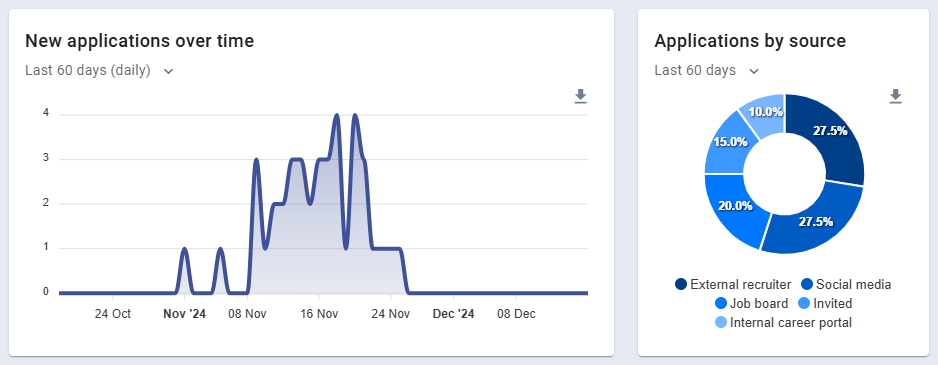
- New Applications Over Time: An area chart showing the number of new applications received within the selected period. This helps you identify trends, such as peaks in applications after a new job posting or marketing campaign. Data can be viewed by day, week, or month, depending on the length of the period.
- Applications by Source: A donut chart that summarizes the percentage of new applications by source type, such as job boards, referrals, or career portals. Understanding where your candidates come from helps you optimize recruitment channels and allocate resources effectively.
Jobs
The Jobs section provides insights into your job postings and their progression over time:
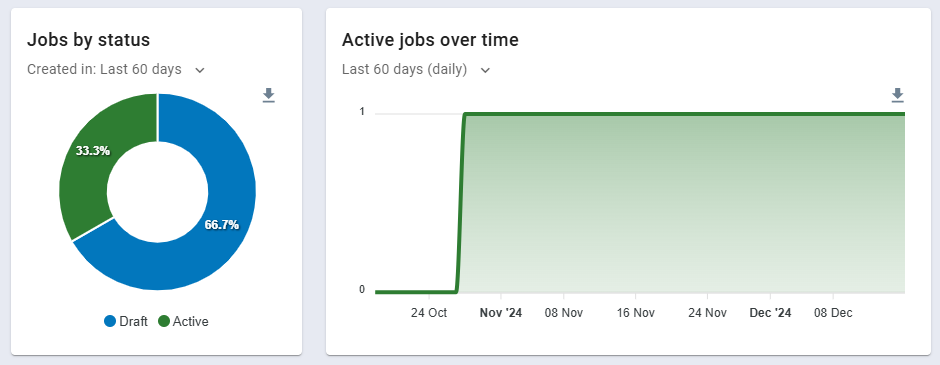
- Jobs by Status: A donut chart breaking down jobs by their current status (draft, active, complete, archived) during the selected period. This chart helps you keep track of job activity and ensure no positions are left behind.
- Active Jobs Over Time: An area chart showing the number of active jobs over the selected period. Tracking activity trends can help you identify seasonal patterns or recruitment bottlenecks.
Recent Activity
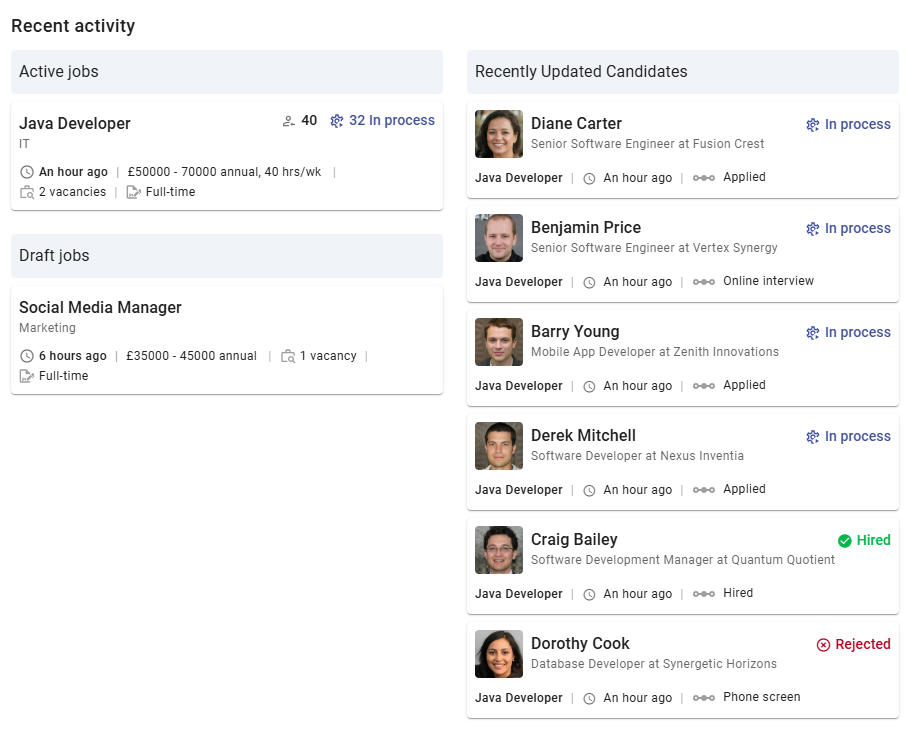
The Recent Activity widget provides a dynamic overview of your ongoing hiring tasks, making it easy to jump back into active work:
- Quick Access to Jobs: Open the Progress Board for active jobs where you’re part of the hiring team, or edit your draft jobs directly. This feature saves time by minimizing navigation.
- Recent Candidate Updates: Displays the six most recently updated candidates for active jobs you’re involved in. Clicking on a candidate opens the corresponding Job Progress Board, defaulting to the candidate’s details view. This ensures you stay informed about the latest changes in your hiring process.