
Compare Candidates
Making well-informed hiring decisions often requires side-by-side comparisons of candidates' qualifications and performance. Zamdit simplifies this process with the Compare Candidates tool, which enables hiring teams to assess candidates effectively and choose the best fit for the role. This feature provides a comprehensive, customizable view of key metrics to streamline decision-making.
Tool Overview
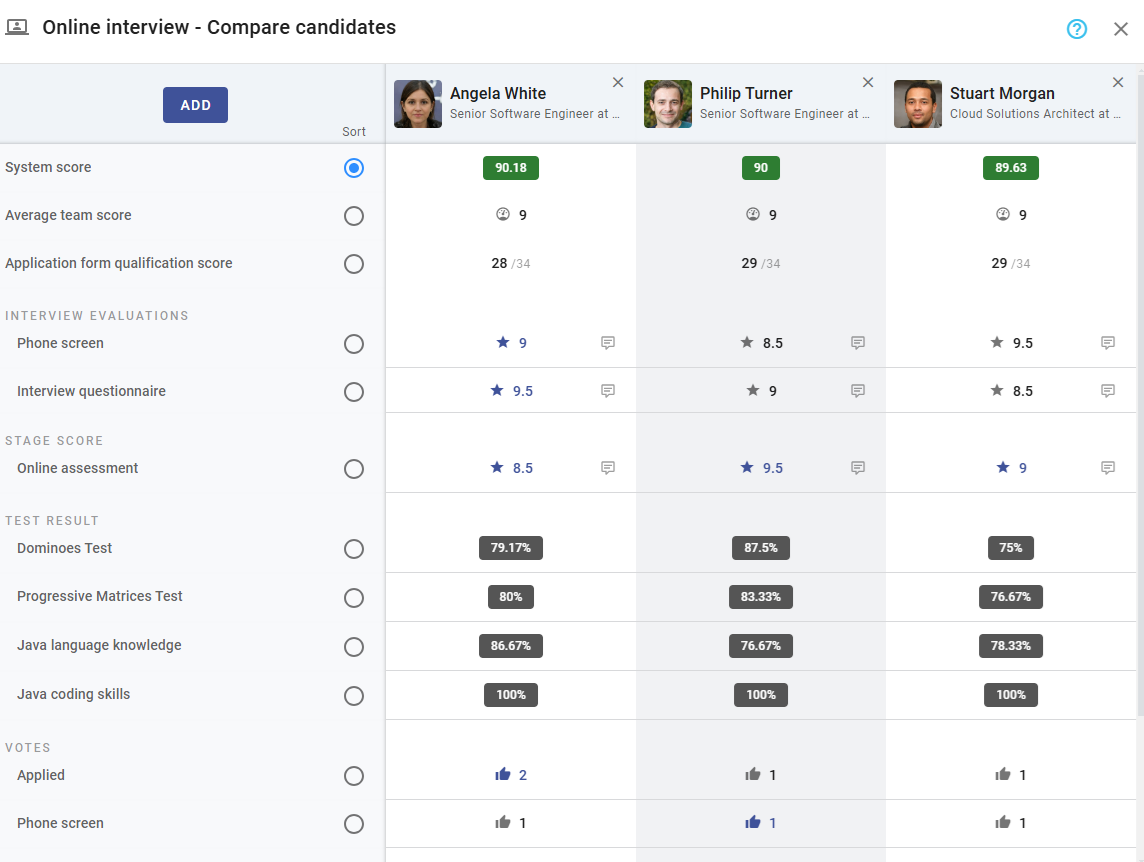
The Compare Candidates tool is available at every stage of the hiring process. It consolidates vital candidate data, including:
- Application Form Qualification Scores: A snapshot of candidates' performance in the initial application stage.
- Final Scores: Aggregated ratings from evaluations completed during interviews and other stages.
- Reviews: Comments and insights submitted by reviewers.
- Votes: Decisions cast by hiring team members during collaborative evaluations.
- Test Scores: Results from online assessments completed by candidates.
- Score Averages: Summaries of key metrics, providing an at-a-glance comparison.
- System Score: A calculated overall score that combines various metrics for holistic evaluation.
The tool also allows sorting candidates based on any displayed field, such as scores, votes, or reviews, for tailored analysis.
Accessing the Tool
To use the Compare Candidates tool:
- Navigate to the stage where the candidates you wish to compare are located.
- Click the Compare Candidates option from the stage column header's action menu.
Adding and Removing Candidates
When you open the Compare Candidates tool, the top candidate in the stage column is automatically added to the comparison view. You can customize the comparison group as needed:
- Adding Candidates:
Click the Add button to select additional candidates from the list. Use the search bar to quickly find a specific candidate.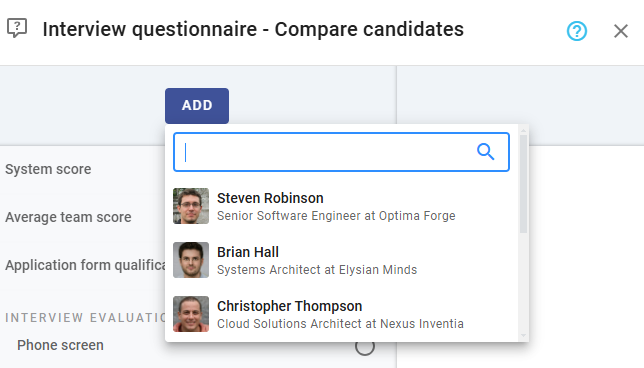
- Removing Candidates:
Click the Close icon at the top-right corner of the candidate's column header to remove them from the comparison view.
There is no hard limit on the number of candidates you can add. However, for clarity and ease of use, we recommend adding only as many candidates as will fit within your screen width. This ensures a cleaner and more focused comparison.
Viewing Candidate Details
For additional context, click on a candidate’s name to open their Candidate Details View in a popup window. This allows you to access comprehensive information about a candidate without leaving the comparison tool.
Benefits of the Compare Candidates Tool
The Compare Candidates tool enhances the hiring process by:
- Streamlining candidate evaluations with side-by-side data visualization.
- Facilitating discussions and consensus-building among hiring team members.
- Highlighting top candidates with clear and objective metrics.
- Saving time by eliminating the need to switch between multiple views or documents.
With the Compare Candidates tool in Zamdit, hiring teams can make faster, smarter, and more confident decisions, ensuring the best talent is chosen for each role.