Promote Your Jobs
Once a job is published, the next step is attracting candidates. To apply, candidates must complete the job's application form, which they access via a unique link sent by email. This link can be received in two primary ways.
Invitation to Apply
Candidates may be invited to apply by a user with permission to send invites (by default, all users). Users with this permission will see the Invite button in the job listing or have access to the job under Invite to Job when selecting a candidate from the candidate pool. When candidates click the link in their invitation email, they will land on the welcome page of the application form, which includes job details, ensuring they understand the role before proceeding.
Request to Apply
Candidates can also request to apply by accessing the job description view themselves. This view can be reached through unique links that vary by source, including specific links for external recruiters, additional sources, and the default source, which is shared in the Careers portal.
For the default source, Zamdit provides three key links:
- Job Description URL: This link leads to the job description view, which can be shared on your website or other channels. This view includes a button for candidates to request to apply. Jobs listed on the Zamdit-generated careers portal will use this link.
- Embeddable Job Description URL: This link provides an iFrame-compatible job description view with a request-to-apply button, allowing you to embed job descriptions directly on your website.
- Request-to-Apply URL: This link takes candidates directly to the application view and is useful if you provide your own job description separately.
External recruiters can share their unique link with potential candidates via email or a custom job description page. On their recruiter portals, they have access to a section with the job description, enabling them to create a custom page or customize emails. Candidates who apply through an external recruiter’s link will be visible on the corresponding recruiter’s portal, where recruiters can track applicants and conduct phone screen evaluations, if applicable.
For additional sources like "LinkedIn" or "Indeed", Zamdit does not currently publish jobs automatically to external boards or social media. However, you can manually post the job and share the corresponding links to attract candidates.
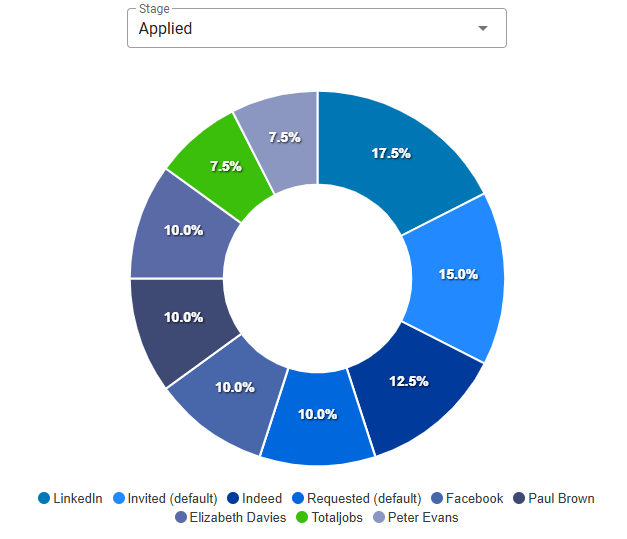
In all cases, Zamdit attributes each candidate to the source based on the link used, providing attribution data that can help you identify the channels that bring in the best candidates.
Criteria for Accepting New Candidates
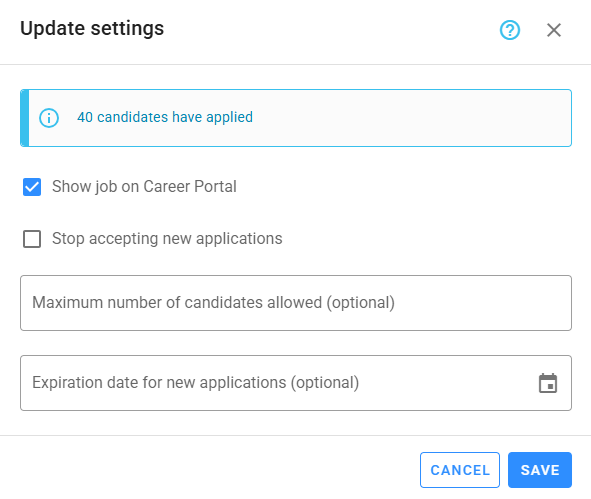
Active jobs will continue to accept new candidates unless any of the following conditions are met: the Stop accepting new applications option is enabled, or limits are set for Maximum number of candidates allowed or Expiration date for new applications and those limits are reached. These settings apply to all recruitment sources, including the careers portal, where you can also choose whether to display the job.