
Job Status
In Zamdit, jobs have four possible statuses: Draft, Active, Complete, and Archived. The job status appears at the top-right of job cards and in the overview section when editing a job. By default, Archived jobs are hidden from the main job list but can be included by selecting Status in the filter options.

The Job Editor’s top bar provides options to change a job’s status and execute other actions based on the current status, such as viewing the job, accessing the progress board, changing application settings, or deleting draft jobs.

Draft
A job begins in Draft status, where it remains fully editable. Only the job owner, an Admin user, or users with specific permissions can edit a job. While in Draft, a job can be deleted if it’s no longer necessary. Once a job is published, it cannot be deleted, only archived.
Active
Once published, a job moves to Active status, and editing is restricted to specific fields to ensure consistency and fairness by applying standard criteria for all candidates. For more information, see Edit a Job.
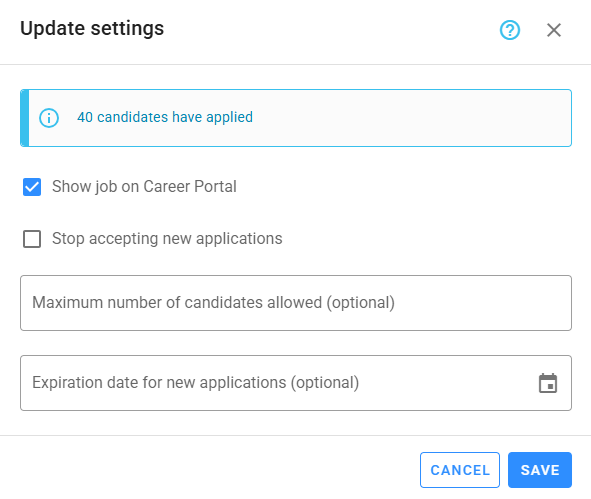
Active jobs will accept new candidates unless one of the following conditions is met: Stop accepting new applications is checked, or criteria are set for Maximum number of candidates allowed or Expiration date for new applications and these criteria are fulfilled. These settings apply to all recruitment sources, including the careers portal, where you can also choose whether to display the job.
While a job is active, the hiring team can make changes in the progress board, send emails, and work with the tasks manager.
Complete
Jobs should be moved to Complete status once all vacancies have been filled; this action must be performed manually. Once a job is Complete, it can no longer be edited, and no further changes are allowed on the progress board or candidates. In this status, jobs still appear in the main job list by default.
Three months after a job is marked Complete, the system will automatically delete the following files:
- Email attachments
- Videos and files in questionnaires
- Uploaded files
- Test snapshots
After four months, the system will delete additional data, including:
- Emails
- Mouse and full-screen events recorded during assessments
- Test cases executed during coding questions
- Code snapshots stored during coding questions
All other job information will remain.
Archived
The Archived status is similar to Complete but, by default, hides the job from the main job list. Use this status when you want to remove a job from the main list.